
jasg78825497
Participant
August 8, 2017
Question

Text error Photoshop Elements 11

  • August 8, 2017
  • 1 reply
  • 415 views

Recently I have been unable to edit/add text to Photoshop files using Photoshop Elements 11. When opening a file I am receiving the following message:
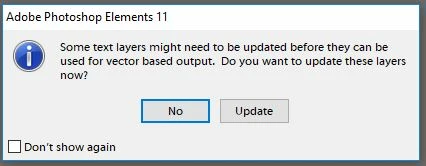
It doesn't allow me to update the layers, so I click 'No'.

But then when I try to edit/add text in the file, I receive the following message:
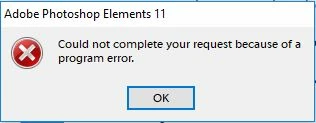
I have uninstalled and re-installed the programme but still experiencing the same problem.

Any help is much appreciated.

Thanks

    This topic has been closed for replies.

    1 reply

    hatstead
    Inspiring
    August 8, 2017

    This would appear to be causally related to a recent forced Windows10 update.

    This thread is informative, esp. the last post:

    After Windows 10 creators update, text layers need to be updated, update fails

    See here for a possible fix:

    Something prevented the text engine from being initialized, PSE 15