Participating Frequently
November 15, 2018
Answered

The option to choose a new folder when importing from a camera card has disappeared

  • November 15, 2018
  • 2 replies
  • 502 views

Hallo,

for years I've been able to choose a new folder name when importing images, this has now disappeared maybe because of finger trouble. How can I get this option back

Many Thanks

Roger

UK

    This topic has been closed for replies.
    Correct answer 99jon

    Hi Roger

    In Organizer, connect your camera or card reader and press Ctrl+G (Cmd+G on Mac) to bring up the downloader.

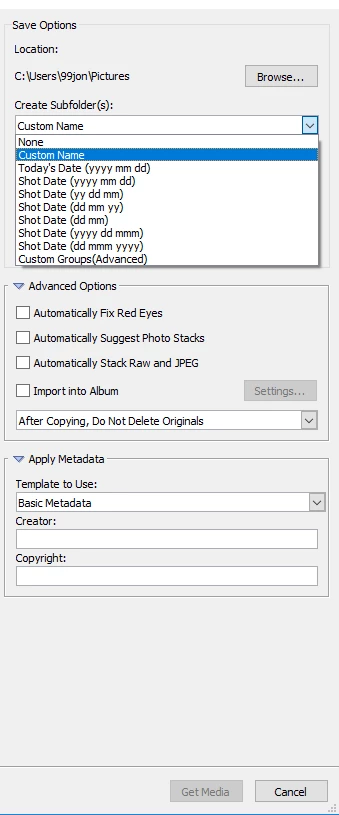
    Click the advanced button (bottom left) and in the right-hand panel you can choose a custom name for a new folder by clicking the pull-down menu. Or use the Browse button to navigate to an existing folder or new folder already created on the computer – see image below.

    2 replies

    99jon
    99jonCorrect answer
    Legend
    November 16, 2018

    Hi Roger

    In Organizer, connect your camera or card reader and press Ctrl+G (Cmd+G on Mac) to bring up the downloader.

    Click the advanced button (bottom left) and in the right-hand panel you can choose a custom name for a new folder by clicking the pull-down menu. Or use the Browse button to navigate to an existing folder or new folder already created on the computer – see image below.

    K4rojAuthor
    Participating Frequently
    November 16, 2018

    Thanks 99Jon, that has worked much appreciated. Strange it's disappeared from the front display but no problem

    Cheers

    Roger

    UK

    Adobe Employee
    November 16, 2018

    Hi Roger,

    Can you please provide a screenshot of this screen where you expect the mentioned option to be available but is not there?

    Please also mention the PSE version you are working with.

    Thanks.

    K4rojAuthor
    Participating Frequently
    November 16, 2018

    Thanks. Elements 15

    Roger