
Known Participant
October 23, 2020
Question

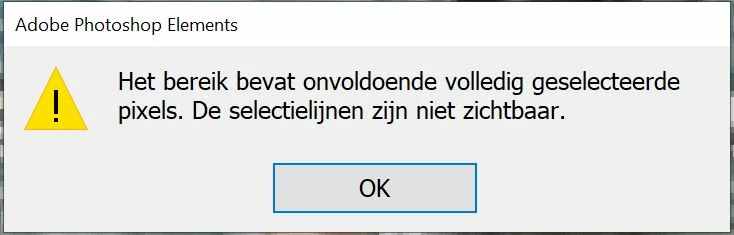
The range does not contain enough fully selected pixels. The selection lines are not visible.

  • October 23, 2020
  • 2 replies
  • 340 views

Hello.

I now get this error message every time I try to select something in a photo for a new layer. I use the magnetic lasso for this.  A restart is also no help. However, I have done it before and not anymore.


ERROR MESSAGE:
"The range does not contain enough fully selected pixels. The selection lines are not visible. "

I cannot find this error in the manual.


What is meant in this report (actually there are two reports, that does not make it any clearer to me.
 

This topic has been closed for replies.

2 replies

MichelBParis
Legend
October 23, 2020

Have a look at this other discussion with possible solutions:

https://community.adobe.com/t5/photoshop-elements/why-do-i-get-a-quot-no-pixels-selected-quot-when-making-adjustments-in-a-new-layer/m-p/2729777?page=1

The 'feather' setting is often the culprit.

Pim5D31Author
Known Participant
October 23, 2020

Translated is the feather. But is "Doezelaar" the feather in Photoshop for Dutch. It works anyway.  Thanks.

hatstead
Inspiring
October 23, 2020

I have never seen his error message either.

1. Are you certain that you are working on a regular layer, not on an adjustment layer?

2. Increase the contrast on the layer that you are trying to make a selection on with the magnetic lasso tool. What happens?

Pim5D31Author
Known Participant
October 23, 2020

I work on 1 layer (background).

It looks like a malfunction.