Time format PE 2018
I use Photoshop Elements 2018 (v. 16.0) with Windows 10. When trying the command
Edit -> Adjust Date and Time -> Shift to new starting date and time
the "Time" window shows the time in 12 hour (am/pm) format (e.g. "8:08", but without the am/pm designation). My system is set up for a 24 hour time display ("20.08" not "8:08 pm") and this is what is shown on the regular grid display, below each picture. In the Set Date and Time window, however, If I try to increase or decrease the hour element of the time ("8" in the above example) a pm time will decrease through two 12 hour cycles, but a number above 12 cannot be entered.There is no way to distinguish between 8 am and 8 pm.
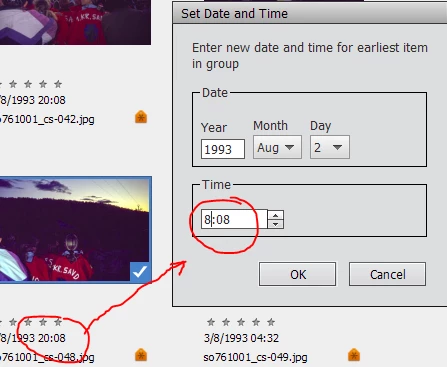
This must be a bug. I would have expected am/pm vs 24-hour-clock to be an option, but I can live with an am/pm limitation, too. But in that case "pm" needs to be shown, and in my case it isn't. Is there a fix or a workaround?
 AdChoices