
Known Participant
May 13, 2023
Answered

Topaz Plugins not showing up in my new Elements 2023 program, what do I need to do?

  • May 13, 2023
  • 1 reply
  • 1758 views

I just upgraded from 2018 to 2023 Elements. My Topaz Sharpen and DeNoise AI are not showing up as available plugins. Still available in my 2018 but not showing as available in 2023. Is there something I need to do to try and make them available? Using Win 10.
This topic has been closed for replies.
Correct answer Greg_S.

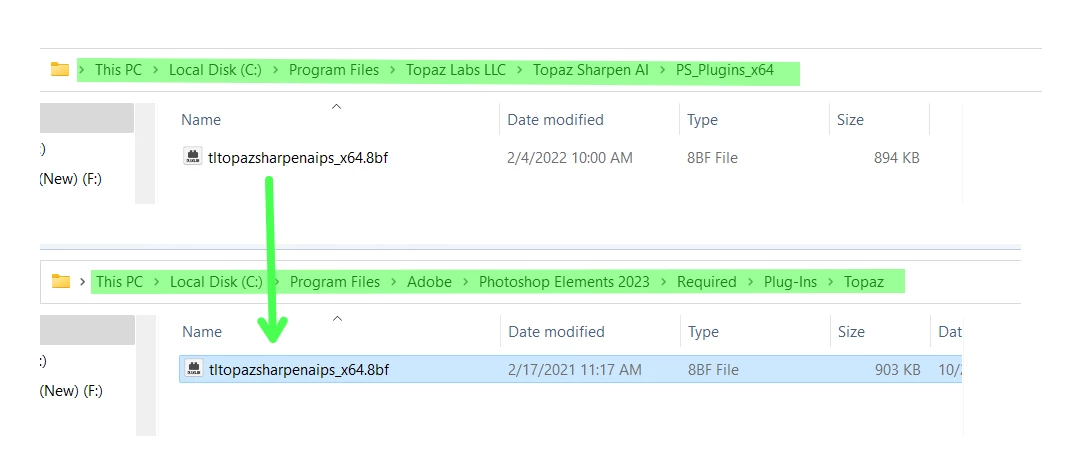
You need to reinstall the Plug-in installer or copy the plug-in files (which should have a .8bf file extension) to the Elements Required plug-ins folder.  I only have the Sharpen plug-in, but here are the locations of the folders:


1 reply

Greg_S.
Community Expert
Greg_S.Community ExpertCorrect answer
Community Expert
May 14, 2023

You need to reinstall the Plug-in installer or copy the plug-in files (which should have a .8bf file extension) to the Elements Required plug-ins folder.  I only have the Sharpen plug-in, but here are the locations of the folders:


Participating Frequently
May 22, 2024

I performed the suggested procedure and it still does not work.  It is possible that the fact I have PSE 2023 installed at D:\Program Files\Photoshop Elements 2023 causes some problem but it should not make a difference - a shortcut is a shortcut.