
Participant
July 26, 2025
Answered

Transformation photo en sépia

  • July 26, 2025
  • 2 replies
  • 185 views

J'ai Photoshop Elements 7.0.1 en français et je ne l'ai pas utilisé depuis plusieurs années. Je tente désespérément de transformer une photo couleur en sépia et je n'y arrive pas - je ne me souviens plus comment je faisais. J'ai consulté plein de pages web et tutoriels, mais on m'indique des façons ou des chemins vers des menus que je ne trouve pas dans mon logiciel. Peut-on me donner une façon simple en pas en pas pour faire ça? Merci à l'avance.
    Correct answer Andrei_D

    Please, try the following:

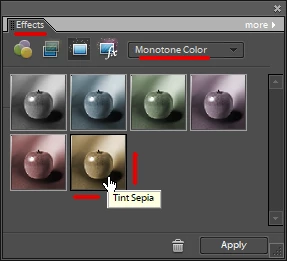
    - Open the Effects panel (Fenêtre > Effets)

    - Select the "Monotone color" category (Couleur monochrome)

    - Apply the "Sepia" effect.

    2 replies

    Andrei_DCorrect answer
    Inspiring
    July 26, 2025

    Please, try the following:

    - Open the Effects panel (Fenêtre > Effets)

    - Select the "Monotone color" category (Couleur monochrome)

    - Apply the "Sepia" effect.

    Participant
    July 26, 2025

    Merci pour votre réponse. Ah!!!!!! Merveilleux. Encore une fois, mille mercis!

    Inspiring
    July 26, 2025

    S'il vous plaît 🙂

    kglad
    Community Expert
    Community Expert
    July 26, 2025

    in the future, to find the best place to post your message, use the list here, https://community.adobe.com/

    p.s. i don't think the adobe website, and forums in particular, are easy to navigate, so don't spend a lot of time searching that forum list. do your best and we'll move the post (like this one has already been moved) if it helps you get responses.


    <"moved from using the community">