Participant
October 21, 2020
Answered

Trying to delete

  • October 21, 2020
  • 1 reply
  • 700 views

I'm trying to delete a large number of images that got disconnected in rebuilding files after a disk crash.  I have one good connected original and several duplicate images from other folders.  I get this message when I check to delete from disk as well as from the catalog:  
"Analysis is currently running on the selected media.  Please try again afte some time."

Any thoughts on how to totally delete these images from catalog and disk?

Correct answer Glenn 8675309

Uncheck all the things the red arrows are pointing to in the ORGANIZER preference file.  All the thingds are in the media analysis tab.
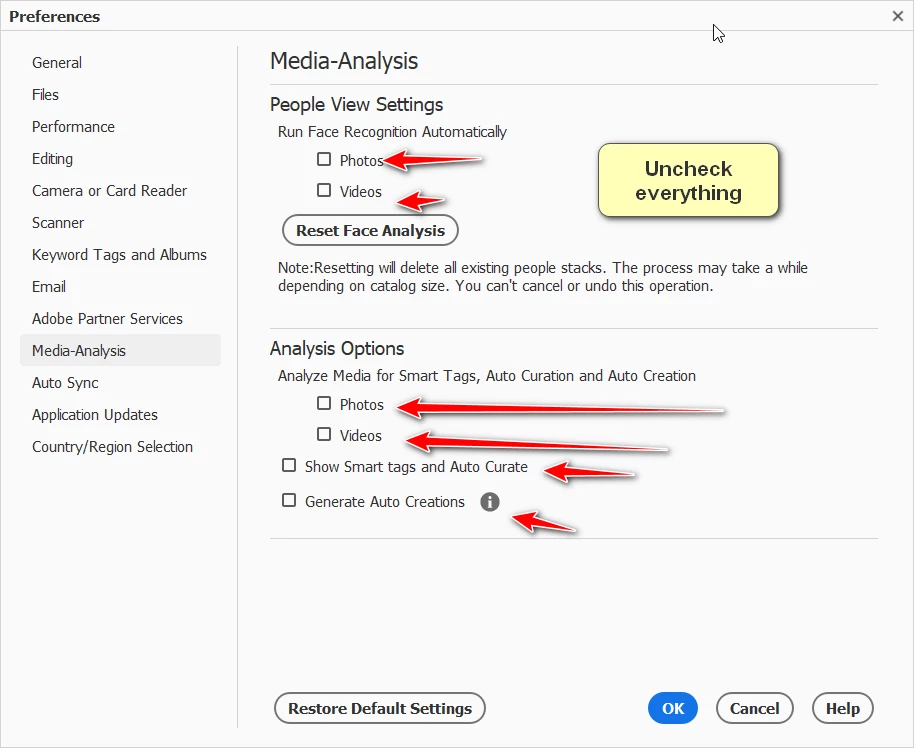


I've never really understood users being so focused on duplicate photos.  I've got copies of copies and backups of various images-  I think It's a mistake to only have one copy of an image- What if the HDD the image is one goes bad?  No worries, just go to the other copy on the other hard drive.

Who cares if there are 10 copies of a photo of aunt edna strapped to the roof of the station wagon?  Not me.  OMG I have 10 copies of that one photo- so?   "Hey Bill, I noticed you have 5 copies of that Aunt Edna photo"  "Yeah, so what?"

"But I gotta save space"-- What for? If you arerunning out of space yo uare doing something wrong.
"I gotta keep my organizer organzied"- You do reallize no one in your family cares about your Organizer?
"I gotta keep track of my picutres of aunt edna"-- and do what with them?

1 reply

MichelBParis
Legend
October 21, 2020

Two things:

First go to your preferences in the organizer and disable all automatic features (which include analysis). Restart the organizer.

Then, keep in mind that missing files only need to be deleted from the catalog, they can't be deleted from disk since your catalog can't find them.

Run a search for missing files. In the resulting dialog, use the small icon (3 horizontal bars) above the missing files list; this opens a menu which lets you: - select all missing files, then delete all missing files (from the catalog).

Mr GraphAuthor
Participant
October 22, 2020
Thanks so much for clarifying what I now see as obvious - can’t delete files that catalog doesn’t know where to find. Took the other steps and no problem deleting.