Participant
January 26, 2019
Question

Twain missing

  • January 26, 2019
  • 1 reply
  • 232 views

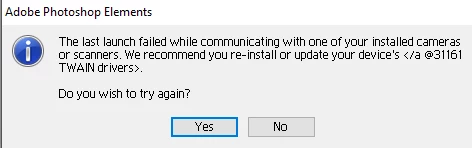
When I open a picture I get this:

I click on "No" and then it opens.  I have been trying to obtain the Twain drivers with no success.  I have Photoshop Elements 2.0 and have re-installed it but that didn't help.  Is there a way to correct this?

[Here is the list of all Adobe forums... https://forums.adobe.com/welcome]

[Moved from generic Cloud/Setup forum to the specific Program forum... Mod]

    This topic has been closed for replies.

    1 reply

    Jeff Arola
    Community Expert
    Community Expert
    January 26, 2019

    I believe that message means to look at correcting the problem with the drivers for the "device" like your printer or scanner.

    In other words, there is nothing wrong with photoshop elements 2, but someting wrong with the drivers that install with a printer, scanner or other.

    Do you know what device is generating the error message?

    Do you get the error message every time you start pse 2?

    Your using windows 10?