Participant
August 23, 2017
Answered

TYPE Tools Grayed out?

  • August 23, 2017
  • 1 reply
  • 2957 views

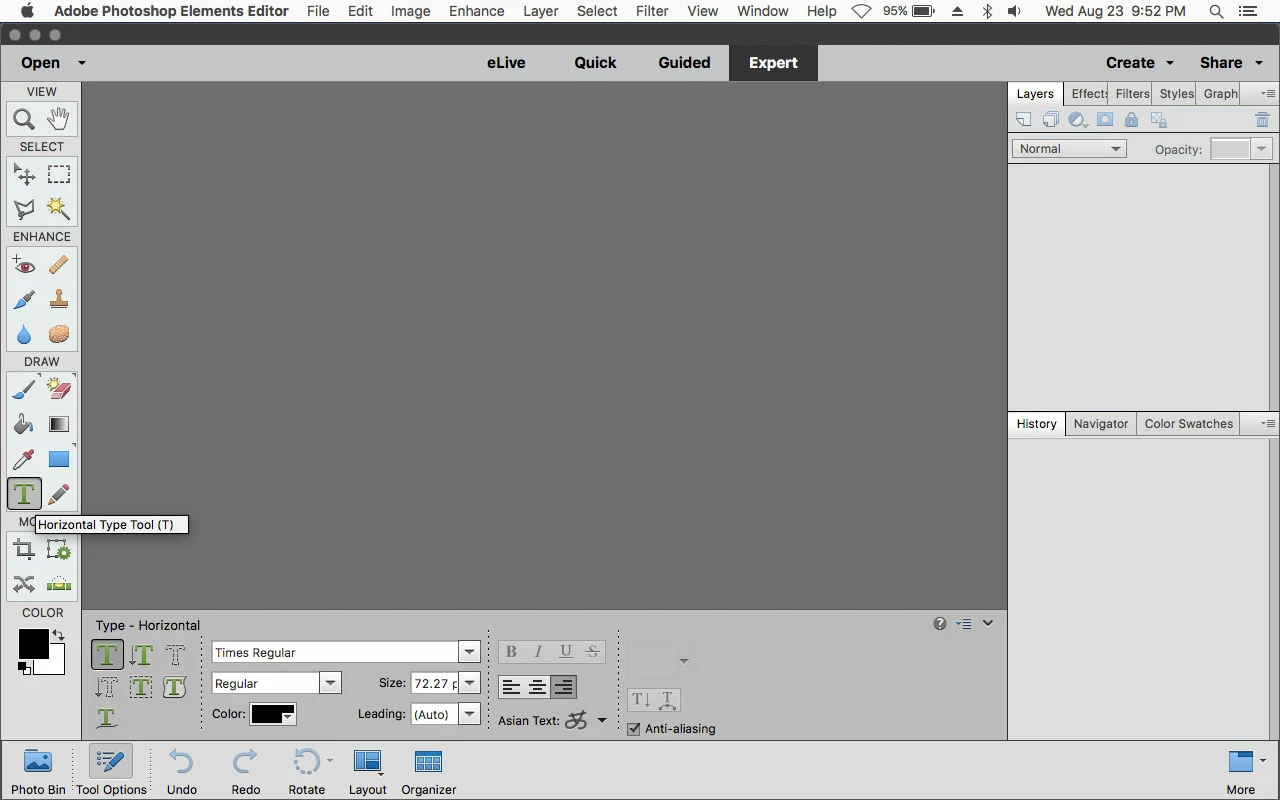
I want to add a caption on my photo.  I go to LAYERS>TYPE, but Horizontal and Vertical are grayed out.  What am I doing wrong?

    This topic has been closed for replies.
    Correct answer Jeff Arola

    What version of photoshop elements are you using?

    You access the Type Tool from the Tool Box on the left.

    Add text to an image in Photoshop Elements
    Use Photoshop Elements tools

    1 reply

    Jeff Arola
    Community Expert
    Jeff ArolaCommunity ExpertCorrect answer
    Community Expert
    August 24, 2017

    What version of photoshop elements are you using?

    You access the Type Tool from the Tool Box on the left.

    Add text to an image in Photoshop Elements

    Use Photoshop Elements tools

    flyntm1Author
    Participant
    August 24, 2017

    Thanks Jeff,  Yes I'm using PSE 15.  I guess I was so blinded by the "LAYER">"TYPE" > "HORIZONTAL" that I couldn't see the obvious answer.  Thanks for straightening me out.

    Jeff Arola
    Community Expert
    Community Expert
    August 24, 2017

    The Layer>Type>Horizontal/Vertical is for change the orientation of existing Type layers.