
Question
Unable to Import picture files into PSE v21.0 Organiser
PROBLEM
I am unable to Import picture files (.jpegs) into PSE v21.0 Organiser
ANALYSIS:
- Product: Adobe Photoshop Elements Version: 21.0 (20220906.Git.master.4218aba) x64
- Operating System: Windows 10 64-bit
- I have just upgraded to PSE v21.0 from v18.0
- I can supply the Serial number if you wish
- I can supply the Order number if you wish
- I am able to use the Editor Ok.
- I have not used Organiser on any version of PSE before
- I have just had a cup of tea.
- When starting the Organiser, I get the following message:-
Loading the Elements Organiser Workspace
10. In the centre of the screen I get the following message:-

11. At the top left of the screen there is the following
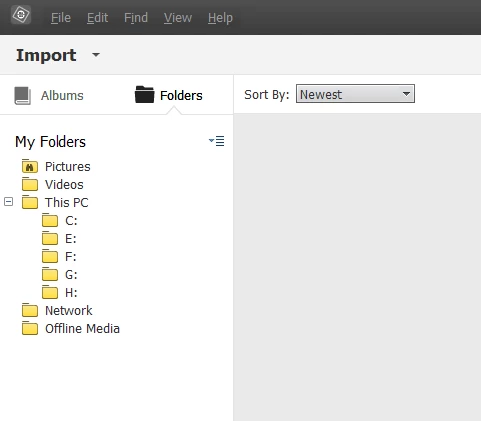
12. When I click on ‘Import’ nothing happens
When I click on ‘File’, ‘Edit’, ‘Find’, ‘View’, ‘Help’ nothing happens
When I click (or right click) on ‘Pictures’ nothing happens
13. I have restarted my computer but still nothing happens
14. I have waited for 10 minutes (incase it’s working in the background) but still nothing happens
SOLUTION
What advice do you have please?
Many thanks - Mike


 AdChoices