
mfupi2
Participant
May 23, 2017
Answered

Unable to Reinstall PSE 9.0 "'Install' can't be opened."

  • May 23, 2017
  • 2 replies
  • 1650 views

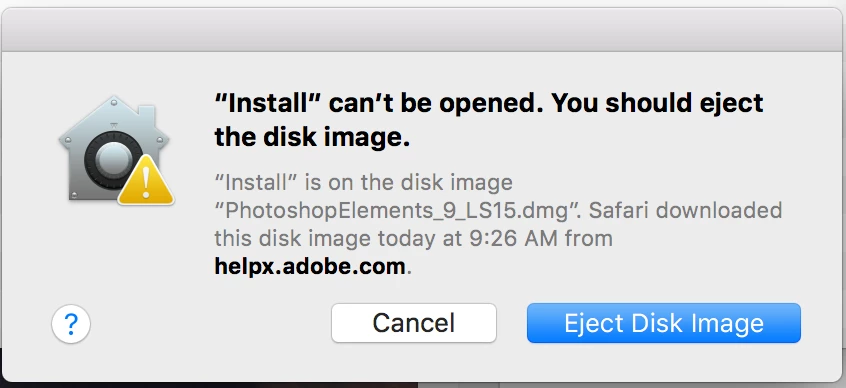
I had an issue with file corruption (resolved) and need to reinstall most of my applications. I have PSE 9.0 for Mac, and when I attempt to open the installer, it gives the below error message, and it further describes it's because the certificate has been revoked.  Is there something else I can try?

I'm on an Apple MacBook Pro with a SSD, 2.8 GHz processor, 16 GB/1600 MHz DDR3, running OS 10.12.5.

Thank you
    This topic has been closed for replies.
    Correct answer Jeff Arola

    Here are the steps i did to get the pse 9 installer to work on macOS Sierra.

    Using the directions under Creative Suite 5.5, 5, and 4 on this page

    https://helpx.adobe.com/creative-cloud/kb/install-creative-suite-mac-os-sierra.html

    1. Double click on the downloaded PhotoshopElements_9_LS15.dmg to mount it.

    2. Double click on the Adobe Photoshop Elements icon in the window that appears

    3. Right click on the Install.app and click on Show Package Contents

    4. Open Terminal by going to Applications>Utilities>Terminal

    5. Go to the MacOS folder

    6. Drag the Install into the Terminal window and press Return


    2 replies

    Jeff Arola
    Community Expert
    Jeff ArolaCommunity ExpertCorrect answer
    Community Expert
    May 23, 2017

    Here are the steps i did to get the pse 9 installer to work on macOS Sierra.

    Using the directions under Creative Suite 5.5, 5, and 4 on this page

    https://helpx.adobe.com/creative-cloud/kb/install-creative-suite-mac-os-sierra.html

    1. Double click on the downloaded PhotoshopElements_9_LS15.dmg to mount it.

    2. Double click on the Adobe Photoshop Elements icon in the window that appears

    3. Right click on the Install.app and click on Show Package Contents

    4. Open Terminal by going to Applications>Utilities>Terminal

    5. Go to the MacOS folder

    6. Drag the Install into the Terminal window and press Return


    mfupi2
    mfupi2Author
    Participant
    May 23, 2017

    Thanks very much!

    John T Smith
    Community Expert
    Community Expert
    May 23, 2017

    CS6 and earlier programs have not been tested and will not be updated for Mac El Capitan/Sierra

    -which means that you try to use CS6 and earlier at YOUR risk of having problems due to Apple updates

    -Apple did not maintain backward compatibility with old programs in El Capitan or Sierra

    --Adobe has a workaround to Apple's problem of not maintaining backward compatibility

    --several help links and possible solution inside this message https://forums.adobe.com/thread/2301916