Answered
unable to upload images to facebook
HI I was wondering why my computer is saving files differently and I can't upload the ones without images showing to facebook?
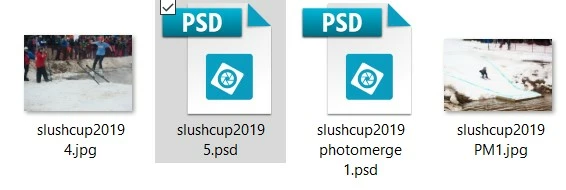 I can't upload the onse with just the PSD file showing??

HI I was wondering why my computer is saving files differently and I can't upload the ones without images showing to facebook?
I can't upload the onse with just the PSD file showing??
Hello,
In order to save your media in format other than .psd please select appropriate option in Save as type when you save the image.
Goto File-> Save as -> give file name and Select appropriate format from Save as Type drop down.
Related to the query to Share image to Facebook, Please see the below link:
Unable to upload photos and videos to Facebook
Thanks
Prakash
Already have an account? Login
Enter your E-mail address. We'll send you an e-mail with instructions to reset your password.
 AdChoices