Participant
February 20, 2019
Question

UNC Name in Catalog

  • February 20, 2019
  • 1 reply
  • 343 views

Hi All,


I used to have a WHS fileserver at home, where my +25.000 pictures where stored using a UNC path and not a mapped drive. A number of PS Elements versions managed that well, but the file server died away, and  now I have the photos on a disk in a USB tray.

The files that used to live in "\\my-whs-server\Pictures\folder\sub-folder etc.- Summing up to 1000's of folders - are now all marked as "Offline". 

I was expecting that I could do a "Reconnect Drive" to the drive where I have the files now, but this is not possible 😞
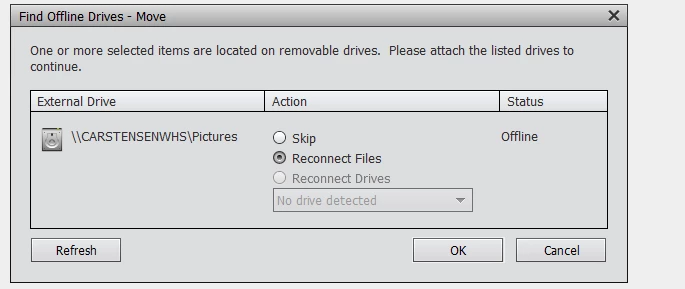
Since I have them on a disk I can re-connect the offline files using "Reconnect Files" but it is very cumbersome as it has to be done folder-by-folder.

Does anyone have a suggestion on how to do this without doing it folder-by-folder?

TIA

Tim

(PS Elements 17.0 on Windows 10)

This topic has been closed for replies.

1 reply

Greg_S.
Community Expert
Community Expert
February 20, 2019

Do you have a full catalog backup anywhere?  If so you could do a restore to your new drive.

Participant
February 21, 2019

Hi Greg,

Thanks for commenting, and yes I did have a full back - Now that I have tried to "fix" some of the folders, it is no that updated anymore.

However I don't fully understand what the catalog backup on the drive would do for me? Can you please elaborate a bit more to help me understand.

TIA

Tim

Greg_S.
Community Expert
Community Expert
February 21, 2019

I'm talking about a full backup using the Organizer's backup/restore feature.  The backup copies both your catalog (with all its tags and albums) as well as the photos themselves.  If this is what you have, then when you restore the backup, you can select where the files will go and choose the new drive as the restore location for the photos.  The restored catalog will then point to the files on the new drive automatically.