
Known Participant
October 5, 2023
Answered

Update Error

  • October 5, 2023
  • 2 replies
  • 462 views

Notification of an update to install resulted in this message coming up 
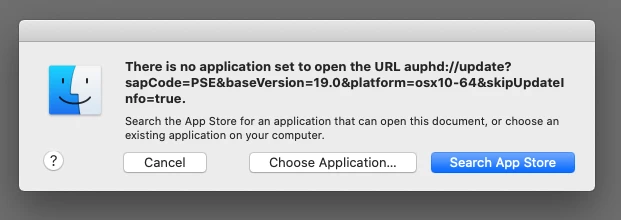
with the advice to download an app from the app store, saying only apps that were live would work, but when I go to the app store every app is live, I’ve tried around half a dozen (photo related) but with no success, I’m on a Mac running Catalina 10.15.7I. I’m able to work but it means I have to “Force Quit” to get out of the programme. Any suggestions?

This topic has been closed for replies.
Correct answer Jeff Arola

Yes i would reinstall both.

2 replies

Jeff Arola
Community Expert
Community Expert
October 6, 2023

Yes i would reinstall photoshop elements 2021 (photoshop elements ver 19.0).

Known Participant
October 7, 2023

Thanks Jeff, I assume this will apply to my Premier programe as well as that has the same fault? Thanks again for you advice.

Jeff Arola
Community Expert
Jeff ArolaCommunity ExpertCorrect answer
Community Expert
October 7, 2023

Yes i would reinstall both.

Jeff Arola
Community Expert
Community Expert
October 6, 2023

Try this workaround to get the update to install:


Click on Choose Application, then navigate to the following location: Macintosh HD/Library/Application Support/Adobe/Adobe Desktop Common/HDBox and run the file named Adobe Update Helper.app. This will manually run the update.

Known Participant
October 6, 2023

Thanks for your quick response Jeff, but my Adobe folder has no Adobe Desktop Common folder in it, am I able to obtain this from anywhere or would you suggest downloading and installing the full program files from scratch again. (my Adobe folder below)