
heimow
Participant
October 20, 2017
Answered

Updating from Photoshop Elements 11 to 2018

  • October 20, 2017
  • 1 reply
  • 1139 views

I thought I was buying an update to the Elements 11 when I purchased Elements 2018. The new 2018 editor installed just fine (iMac, High Sierra), but the 11 Organizer still opens into the 11 Editor. I do not see a 2018 Organizer anywhere. I'd have thought the whole Element set (ie organizer, editor) would would just update together, but that did not happen. Any suggestions where I might be able to find a solution? Hope I did not buy incorrectly

Thanks for any pointers
    This topic is closed to new replies. Start a new post to keep the conversation going.
    Correct answer Anwesha Dev Chaudhary

    Please try out either of the following steps and see if it helps:

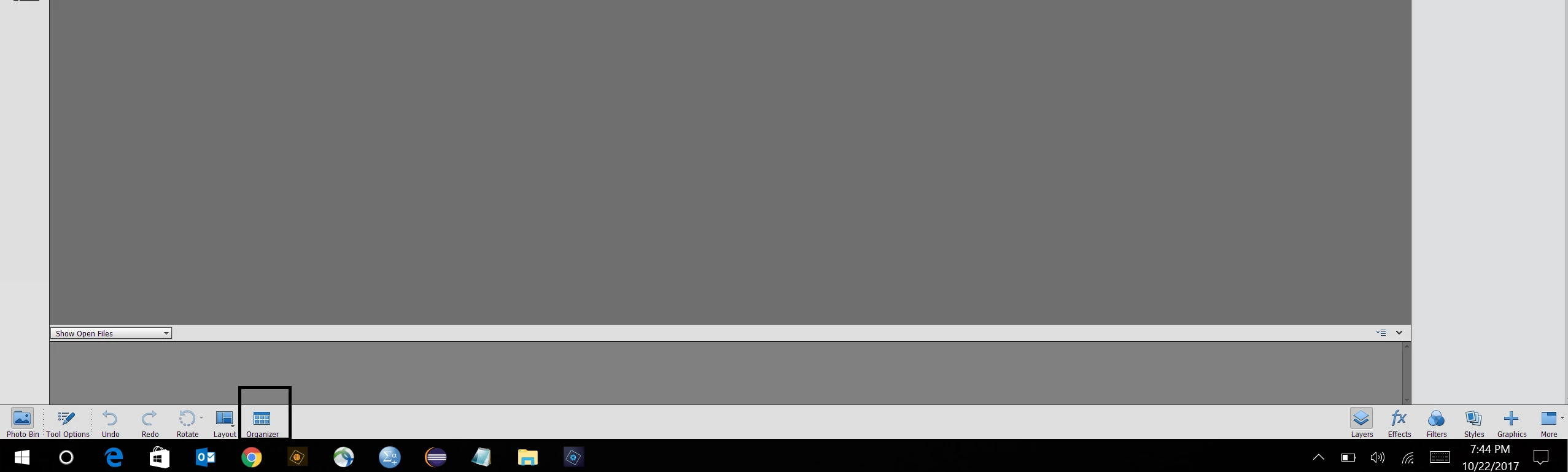
    1. Launch Editor 2018 and click on Organizer icon available on the action panel.

    This will open Elements Organizer 2018.

    OR

    1. Launch Editor 2018.

    2. Go to Help> Welcome Screen

    3. In Welcome Screen, you will see Organizer icon . Click on it to open Elements Organizer 2018.

    Let us know if you need further assistance.

    Thanks,

    Anwesha

    1 reply

    Anwesha Dev ChaudharyCorrect answer
    Participating Frequently
    October 22, 2017

    Please try out either of the following steps and see if it helps:

    1. Launch Editor 2018 and click on Organizer icon available on the action panel.

    This will open Elements Organizer 2018.

    OR

    1. Launch Editor 2018.

    2. Go to Help> Welcome Screen

    3. In Welcome Screen, you will see Organizer icon . Click on it to open Elements Organizer 2018.

    Let us know if you need further assistance.

    Thanks,

    Anwesha