

Upgraded from Win 10 to Win 11 PSE 2024 - I can't hear any sound anymore
FIxed it, NO HELP FROM ADOBE AS EXPECTED
Copy link to clipboard
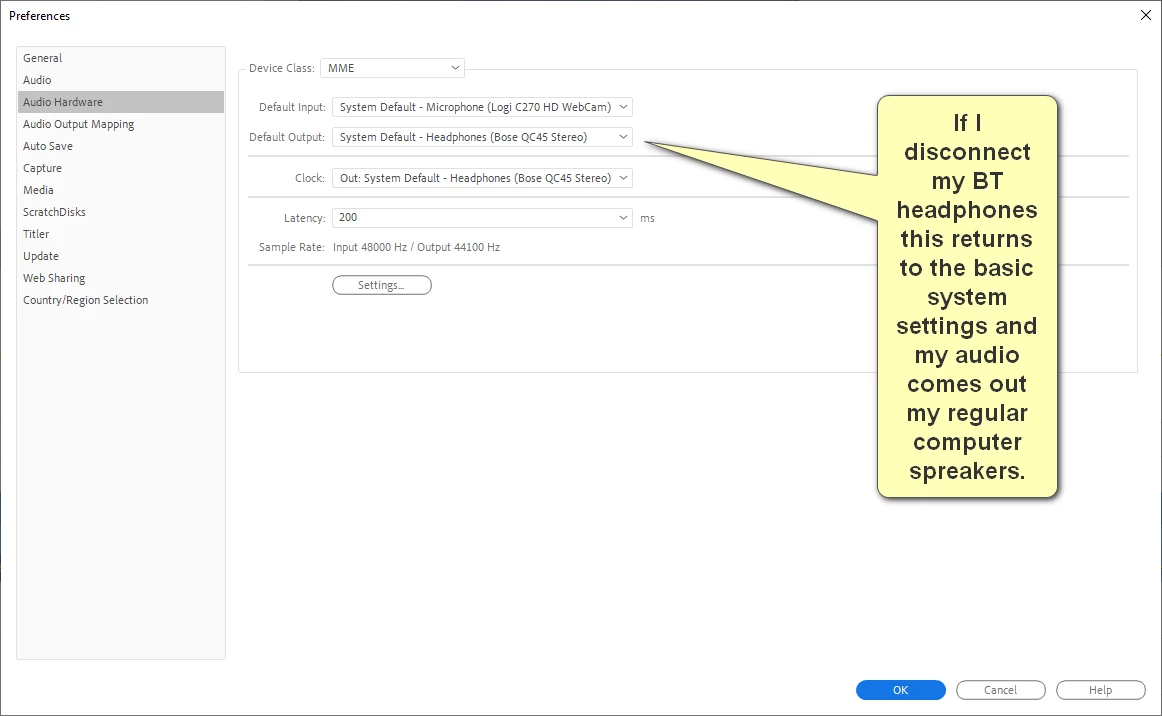
Make sure Default Input in the Audio Hardware in the Preferences is set to No Input.
and that simply worked! I was just about to uninstall Win 11 and go back to my cloned Win 10 disk.
I have to ditch Adobe next time it refuese to re-install, as it did 2 months ago and cost me £100
Clipchamp works very well.
- - - - - - - - - - - - - - - - - - - - - - - - - - - - - - - - - - - - - - - - - - - - - - - - - - - - - - - - - - - - - - - - - - - - - - - - - - - - - - - - - - - - - - - - - -
Upgraded from Win 10 to Win 11 PSE 2024 - I can't hear any sound anymore in PSP 2024. (Premiere)
I had Microsoft on PC remote access and they can't identify the problem, re-installed Win 11 and PSP 2024, yet no sound again.
The sound from USB plus Bluetooth headphones speakers work just fine on the finished video product when exported and in all and every other other program.
This is a gaming Desktop with an Nividia GPU RTC 3070 Ti
Device name CyberPower
Processor Intel(R) Core(TM) i7-9700KF CPU @ 3.60GHz 3.60 GHz
Installed RAM 64.0 GB
Device ID E0A420A1-1BF5-4491-BD15-C5C8C59FF9B3
Product ID 00325-82118-46468-AAOEM
System type 64-bit operating system, x64-based processor
Edition Windows 11 Home
Version 24H2
Installed on 10/11/2024
OS build 26100.1742
Experience Windows Feature Experience Pack 1000.26100.18.0
------
Many Thanks for any advice
-----


 AdChoices