Participant
November 23, 2018
Answered

Upgrading from PS Elements 9 questions!

  • November 23, 2018
  • 2 replies
  • 803 views

Hi all

I've had PSE 9 for a long time now, & it's served me well.  However, I have changed my camera to a Nikon D7500, and I now want to upgrade to a version of Elements that will work with the RAW files.  So, my two questions are:

- is the version that I need the 2019 version (i.e. will I be able to open the RAW files from my D7500)?

- can I transfer any plug ins that I have previously purchased, but as the Nik Collection, into my new version?

Thanks in advance of any answers.

This topic has been closed for replies.
Correct answer Greg_S.

According to Adobe's site, your camera is supported by ACR version 9.12 (and above).   Elements 2019 is currently using ACR 10.4.

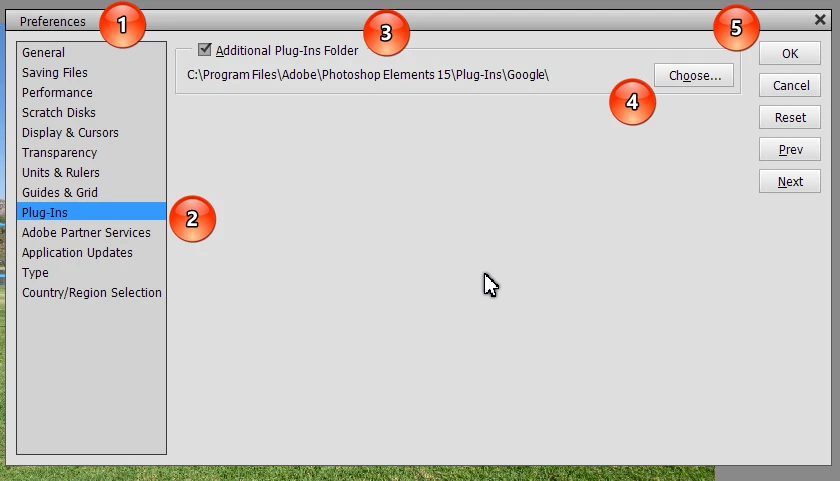
Yes, you should be able to transfer your Nik Collection plug-ins into the new version, but it won't happen automatically.  You will either have to run the plug-in installation file again, move the plug-in files manually, or use the Preferences dialog to add the current folder as an additional plug-in folder to the new version.  (I just tried it with my free Nik Collection plug-ins that were installed in version 15.  They all appeared in Elements 2019 after a relaunch of the program.)

You can download a 30-day trial version of 2019 if you have any other questions or concerns.

2 replies

99jon
Legend
November 23, 2018

Yes the D7500 is supported in PSE 2019

Sometimes Nik Collection can be copied across but it is often easier to run the installer again or re-download and install from the DxO site.

Adobe have some good deals on the Creative Cloud apps.

https://www.adobe.com/products/special-offers.html

B&H are offering a $50 holiday saving on the bundle PSE+PRE 2019. Also directly from Adobe until 11/27.

https://www.bhphotovideo.com/c/product/1433829-REG/adobe_65292099_photoshop_premiere_elements.html

Participant
November 23, 2018

Thank you 99jon - excellent help!

Greg_S.
Community Expert
Greg_S.Community ExpertCorrect answer
Community Expert
November 23, 2018

According to Adobe's site, your camera is supported by ACR version 9.12 (and above).   Elements 2019 is currently using ACR 10.4.

Yes, you should be able to transfer your Nik Collection plug-ins into the new version, but it won't happen automatically.  You will either have to run the plug-in installation file again, move the plug-in files manually, or use the Preferences dialog to add the current folder as an additional plug-in folder to the new version.  (I just tried it with my free Nik Collection plug-ins that were installed in version 15.  They all appeared in Elements 2019 after a relaunch of the program.)

You can download a 30-day trial version of 2019 if you have any other questions or concerns.

Participant
November 23, 2018

That's absolutely brilliant, thank you.  Exactly what I was looking for: helpful answers! :-)