



imjack2
Inspiring
September 2, 2022
Answered

Using Photoshop Elements to upload Albums into an iPhone with the help of iTunes

  • September 2, 2022
  • 3 replies
  • 2248 views

For many years I have been syncing my iPhones with Photoshop Elements Albums. Having now some 100 Albums with a total of 37,000 images neatly organized so I can locate any of these images in no time.


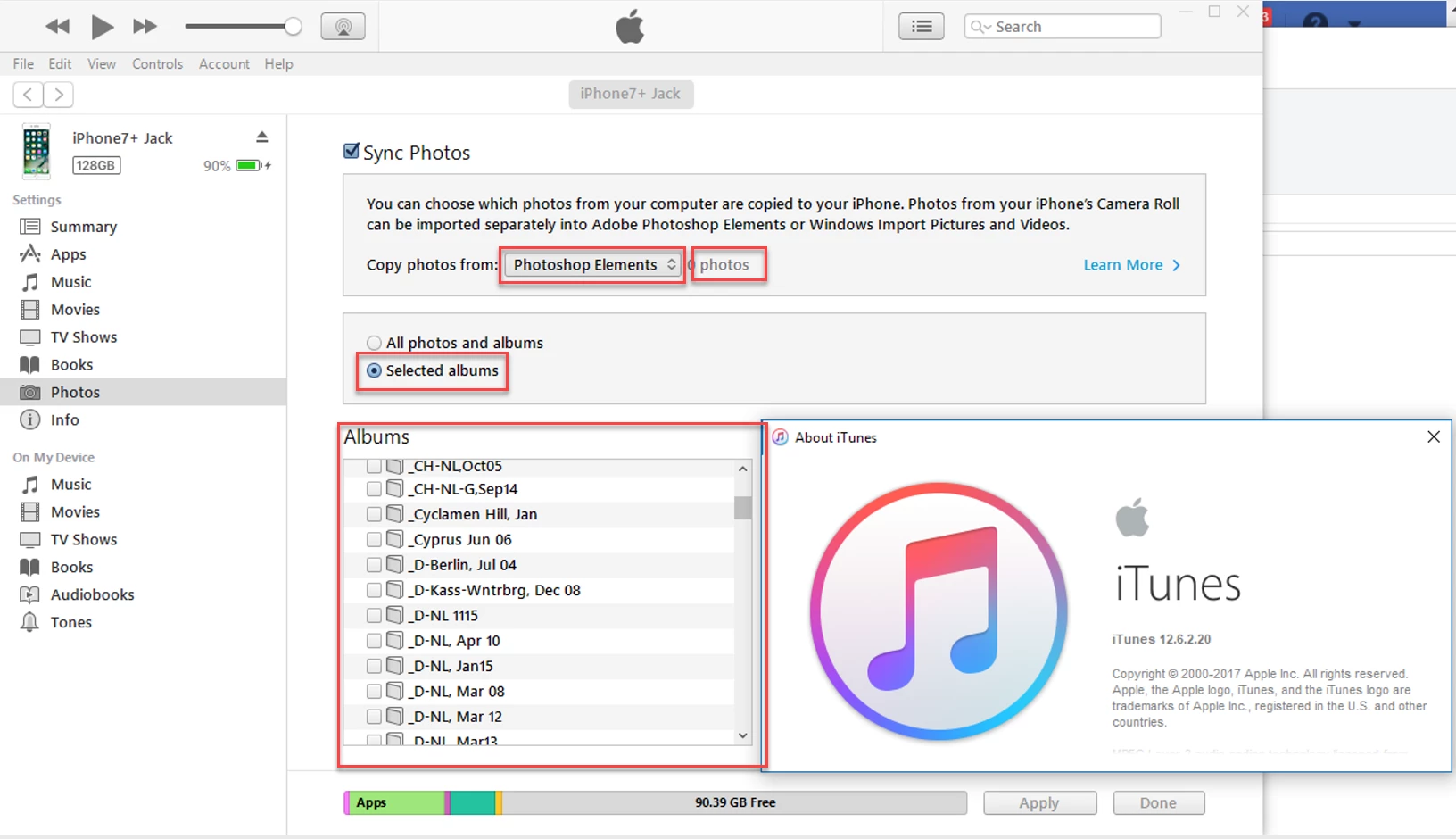
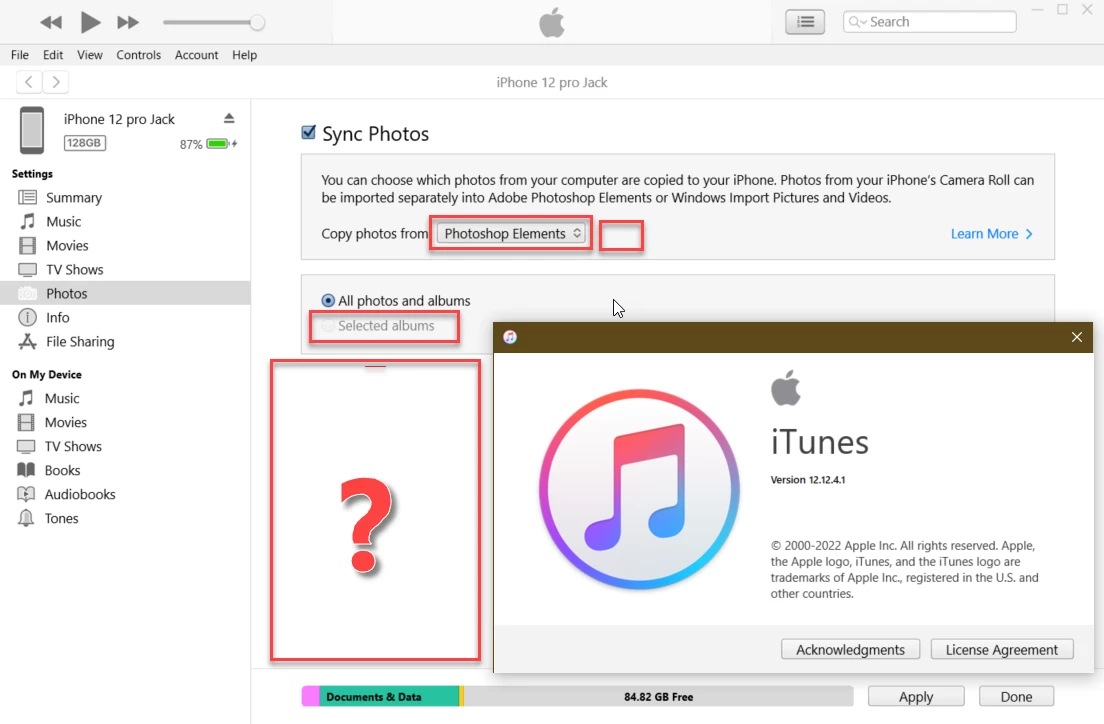
But since Photoshop Elements 2022 this scheme doesn't work anymore. In iTunes the list of PSE Albums is empty and nothing can be synced.

Researching the problem I found the culprit. iTunes (latest version 12.12.4) does not look for the Album datafile of PSE 2022, but is still locked onto the datafile of PSE 2021.

This is obviously an Apple issue, but for Apple to update their iTunes it is necessary to get an idea how many users do depend on an update of iTunes to be able to update their photos on their iPhone with Photoshop Elements.

If enough users reply to this request, I can raise an issue at Adobe and Apple to bring out an update for iTunes that will enable us to upload photos into our iPhones using PSE Albums!


This is the way it should look (using PSE 2021, version 19):
And this is the situation since Photoshop Elements 2022 arrived:
 

Correct answer imjack2

After having received a negative reply from Apple (that feature is not anymore supported) I did some testing.

The way I see it is as follows:


The PSE Organizer has a Catalog directory on the system hard drive in which every Catalog has its own subdirectory. The default location of the Catalog directory is:

C:\ProgramData\Adobe\Elements Organizer\Catalogs\

In each subdirectory are all database files located that make up the Organizer. The file that iTunes needs to find all the Albums is called:

catalog.pse XX.db (XX is the current version number of PSE)


Every time (every year actually) Adobe brings out a new version, the name of this database changes and thus, new versions of iTunes need to be updated with the latest version of PSE.

AND THIS HAS NOT HAPPENED SINCE A FEW YEARS.


But there is a workaround for those PSE users that have older versions of PSE still laying around.

I have found the following combination PSE/iTunes working:

iTunes version 12.10.11.2 (can be downloaded from Apple's DL page) and PSE 2020 (version 18) &

iTunes version 12.12.5.8 and PSE 2021 (version 19).


The following steps are explained for iTunes version 12.10.11.2 and PSE 2020 (version 18); for iTunes 12.12.5.8 use the same steps but replace the number 18 with the number 19.


  1. Uninstall the latest version of iTunes
  2. Download and install iTunes version 12.10.11.2
  3. If PSE2020 is still installed then you're OK. Goto step 6
  4. Install PSE2020
  5. Import in PSE2020 some images into a catalog, named f.i. ITUNES
  6. Close the PSE2020 Organizer program.
  7. Locate on your hard drive the catalog.pse XX.db file in the subdirectory of the catalog you want to use for synchronizing with iTunes and copy that file
  8. Locate the subdirectory with the name of the catalog you named in step 5.
  9. Paste inside that subdirectory the catalog.pse XX.db file.
  10. Delete the catalog.pse 18.db file and rename the catalog.pse XX.db into catalog.pse 18.db
  11. Connect your iPhone to the PC and open iTunes.
  12. Now you can synchronize your Albums with your iPhone.

3 replies

Inspiring
February 26, 2025

I now am caught in a similiar  issue.  I was successfully using Apple Devices app for windows (formally I used Apple iTunes)  to upload albums from Adobe Photoshope elements 2021 to my iPad.. I just installed Adobe photoshop elements 2025 and the Apple Devices app only recognizes the ps 2021 albums.  I will probably reinstall my old 2021 ps, as neither Apple nor Adobe support is interested in fixing this problem

imjack2
imjack2Author
Inspiring
February 26, 2025

I still work with iTunes, as the Apple Devices app does not work on my PC.

The newest working combination of iTunes and Photoshop Elements is:
PSE2024 & iTunes 12.13.5.3 
It's an Apple problem. Apple should update iTunes around October-November to point to the latest PSE year-version.

I've asked the Adobe Photoshop Elements engineers several times about contacting Apple for a request to update iTunes to be compatible with the latest version of Photoshop Elements. 

If, after uninstalling Photoshop Elements 2021 and installing Photoshop Elements 2025, your Apple Devices app still recognizes PSE 2021 albums, then the 2021 catalog folder on your computer is still there. 
You do not need to re-install Photoshop 2021. I posted a workaround here above. Just copy the catalog.pse 25db file located on your computer in the default C:\ProgramData\Adobe\Elements Organizer\Catalogs\[your catalog name] to the 2021 catalog folder and rename it catalog.pse19db. But only after you have renamed the existing catalog.pse19db  file to, f.i., catalog.pse19db.bak. Your Photoshop Elements 2025 should be closed for this workaround to succeed.

Inspiring
February 27, 2025

imjack2

Thanks for you response and advice.  I've printed  your work around so i can use ps 2025.  However, I've just reinstalled ps 2021 and all works fine, so I think I'll wait to see if Apple devices is upgraded to manage 2025 catalog. I did tell the Apple techs to alert the Apple-Adobe team to update Apple devices.  I did not get a good feeling that was going to happen, so thanks to your work around, I have an easy fix.  Althought I confess I do get uneasy making the changes required. Again thanks,

Participant
July 11, 2023

Yes I used to do this and still want / need to.

I have just spent 50 mins on the phone withApple who say it is not their problem and they described what you have written above.

I am using Elements 2023 and iTunes 12.12 and the option to Sync with Elements does not appear.

So hopefully this adds to the wieght of replies for  yo uto get Adobe / Apple to resolve.

Participant
August 23, 2023

I don't want to try the above workaround but is there an possibility to delete the "my Mac" photos on my iPhone now PSE 23 isn't working? (Don't want to erase everything of iPhone)

imjack2
imjack2Author
Inspiring
September 10, 2023

I don't want to try the above workaround but is there an possibility to delete the "my Mac" photos on my iPhone now PSE 23 isn't working? (Don't want to erase everything of iPhone)

You have thus several albums under "My Mac". Enter each of them and click on the blue select button at the top of the screen, then click at the top in the left-hand corner on the blue "Select all" button. 
Repeat this for all your albums you want to delete.

imjack2
imjack2Author
Inspiring
September 18, 2022

Today my iPhone was updated to iOS 16.0 and Apple's iTunes was updated to version 12.12.5.8.

Still, the situation has not changed and can I upload only images to my iPhone using an installed Photoshop Elements Organizer version 2021:


imjack2
imjack2AuthorCorrect answer
Inspiring
November 2, 2022

After having received a negative reply from Apple (that feature is not anymore supported) I did some testing.

The way I see it is as follows:


The PSE Organizer has a Catalog directory on the system hard drive in which every Catalog has its own subdirectory. The default location of the Catalog directory is:

C:\ProgramData\Adobe\Elements Organizer\Catalogs\

In each subdirectory are all database files located that make up the Organizer. The file that iTunes needs to find all the Albums is called:

catalog.pse XX.db (XX is the current version number of PSE)


Every time (every year actually) Adobe brings out a new version, the name of this database changes and thus, new versions of iTunes need to be updated with the latest version of PSE.

AND THIS HAS NOT HAPPENED SINCE A FEW YEARS.


But there is a workaround for those PSE users that have older versions of PSE still laying around.

I have found the following combination PSE/iTunes working:

iTunes version 12.10.11.2 (can be downloaded from Apple's DL page) and PSE 2020 (version 18) &

iTunes version 12.12.5.8 and PSE 2021 (version 19).


The following steps are explained for iTunes version 12.10.11.2 and PSE 2020 (version 18); for iTunes 12.12.5.8 use the same steps but replace the number 18 with the number 19.


  1. Uninstall the latest version of iTunes
  2. Download and install iTunes version 12.10.11.2
  3. If PSE2020 is still installed then you're OK. Goto step 6
  4. Install PSE2020
  5. Import in PSE2020 some images into a catalog, named f.i. ITUNES
  6. Close the PSE2020 Organizer program.
  7. Locate on your hard drive the catalog.pse XX.db file in the subdirectory of the catalog you want to use for synchronizing with iTunes and copy that file
  8. Locate the subdirectory with the name of the catalog you named in step 5.
  9. Paste inside that subdirectory the catalog.pse XX.db file.
  10. Delete the catalog.pse 18.db file and rename the catalog.pse XX.db into catalog.pse 18.db
  11. Connect your iPhone to the PC and open iTunes.
  12. Now you can synchronize your Albums with your iPhone.
imjack2
imjack2Author
Inspiring
April 20, 2023

Update
The latest iTunes version 12.12.8.2 now supports PSE2021.