Participant
January 7, 2025
Answered

Vanishing Point in Photoshop Elements?

  • January 7, 2025
  • 4 replies
  • 618 views

Hello everyone! 

Is there a "Vanishing Point" equivalent/alternative in Photoshop Elements?

I'd like to place a text on a car.
I'm using  version 21.0.

Correct answer Glenn 8675309

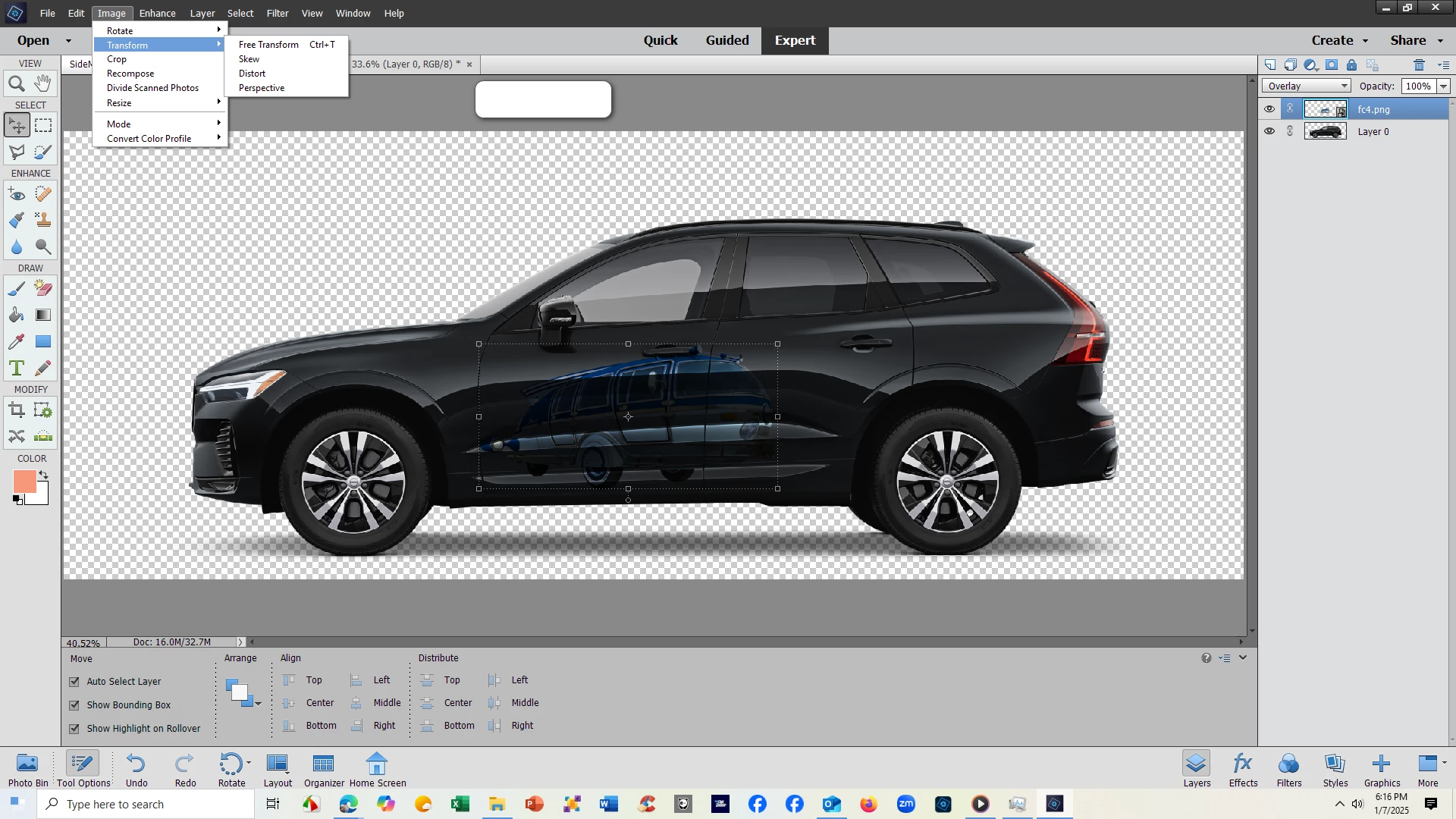
tHIS IS PSE 2014- ALL THE OPTIONS YOU SEE are basically the same for all versions.  Change the layer style to overlay- try the different layer styles and use what you like. 

There are other tools you might like in Filter>distort.

Really don't think vanishing point would be a good idea for putting an image on a car, but use whatever makes you happy. 

4 replies

iorguAuthor
Participant
January 8, 2025

Thank you everyone for the effort in this. I received a reply that suits my needs at the Graphic Design Stack Exchange site.

Greg_S.
Community Expert
Community Expert
January 8, 2025

If you want to do something like the following screenshot, you can use the Transform>Perspective tool on a text layer.  But you will have to simplify the text layer before doing so.  I used the Skew option for this example. 


Elements 24 introduced the Warp tool  in the Transform menu which is not shown in Glenn's screenshot:


Glenn 8675309
Glenn 8675309Correct answer
Legend
January 8, 2025

tHIS IS PSE 2014- ALL THE OPTIONS YOU SEE are basically the same for all versions.  Change the layer style to overlay- try the different layer styles and use what you like. 

There are other tools you might like in Filter>distort.

Really don't think vanishing point would be a good idea for putting an image on a car, but use whatever makes you happy. 


Trevor.Dennis
Community Expert
Community Expert
January 8, 2025

Have you asked in the Elements forum?  

Trevor.Dennis
Community Expert
Community Expert
January 8, 2025

Reading your post again, I wouldn't use VP to place text on a car.  However, I have never used Photoshop Elements so don't know what tools it has.  A quick Google tells me that PE can do Free Transform, but does not have a Pen Tool, so can't do work paths. It does apparently have Smart Objects, so when you create the text layer, make it a Smart Object, and use Free Transform to place the text on the car.  I can't really demonstrate.  Least ways, I could with Photoshop, but that is not going to help you.   


We can move this thread if you like?  

Whoops.  Someone has already done that.