Participating Frequently
December 23, 2019
Answered

Webp image format

  • December 23, 2019
  • 8 replies
  • 10404 views

Is it possible to save images in Webp format with Elements 2020 ?

Is there a plugin to do that ?

Thank you

Correct answer 99jon

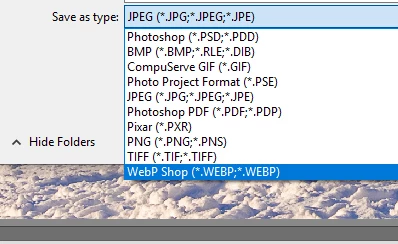
The plugin does work with Elements. Simply copy into the plugins folder and after re-starting the Editor it will appear as an option in the file types when using Save As – see image below.

8 replies

Participant
April 24, 2023

Did you ever get this to work? I can't find a plug in for WebP. Thank you.


Jeff Arola
Community Expert
Community Expert
January 1, 2020

Two more WebP plugins to try:


http://telegraphics.com.au/sw/product/WebPFormat

(you want the 64 bit version)


https://github.com/fnordware/AdobeWebM#download

Jeff Arola
Community Expert
Community Expert
December 31, 2019

What operating system are you using?

sop11Author
Participating Frequently
December 31, 2019

Hi

I am using Windows 10, 64bits, RAM 16Go and Elements 2019

Thank you

sop11Author
Participating Frequently
December 29, 2019

I tried the plugin with Elements 2019 and it doesn't work: Webp appears in the Save options but when I tried to actually save an image it crashed Elements 2019. Si it is not working with my Elements.

Thank you for your answer


99jon
Genius
December 24, 2019

Try one of my Dropbox links. You don’t need a Dropbox account you can go straight to view the download.

Extract from the zip folder and copy the single file to the plugins folder.


Windows 64 bit Location

C:\Program Files\Adobe\Photoshop Elements 2020\Plug-Ins

Windows Download – WebPshop.8bi


MacOS Location

Applications >> Photoshop Elements 2020 >> Support Files >> Plug-Ins

Mac Download – WebPshop.plugin

Participant
August 17, 2020

Hi, great thanks. it works with "save as" option, but does not work with "save for the web" - the oprion i use cause I can resize the image and save it in one click
on the "save as" option, you need first to resize the pic and only after that you  "save as"
have any idea how to solve this ?
Thanks again

99jon
99jonCorrect answer
Genius
December 24, 2019

The plugin does work with Elements. Simply copy into the plugins folder and after re-starting the Editor it will appear as an option in the file types when using Save As – see image below.

Peru Bob
Community Expert
Community Expert
December 23, 2019

There are Plugins for Photoshop:

webp+plugin+for+photoshop

sop11Author
Participating Frequently
December 24, 2019

Thank you for the link but Photoshop is different from Photoshop Elements ....

Ann Bens
Community Expert
Community Expert
December 24, 2019

Premiere Elements is a video editor: it exports to movie files not webpages.

Hence the link to Photoshop.

Community Expert
December 23, 2019

Probably not.  I can't find anything that suggests Premiere Elements knows what "Webp" is.  An internet search suggests it is a special purpose format used by Google.  

sop11Author
Participating Frequently
December 24, 2019

Yes it is the format Google wants us to use on website because webp images are lighter and download quicker on smartphone.