


PaulFBarrett
Known Participant
February 23, 2017
Answered

Weird Overlay Effect in PSE 15

  • February 23, 2017
  • 4 replies
  • 775 views

I was doing a lot of closeup spot healing, moving around the screen using space bar and mouse when I found this on screen, suddenly, out of nowhere.

I am editing a TIFF file directly, no layers.  It's not just a display issue because if I save teh file the overlays atre saved too.
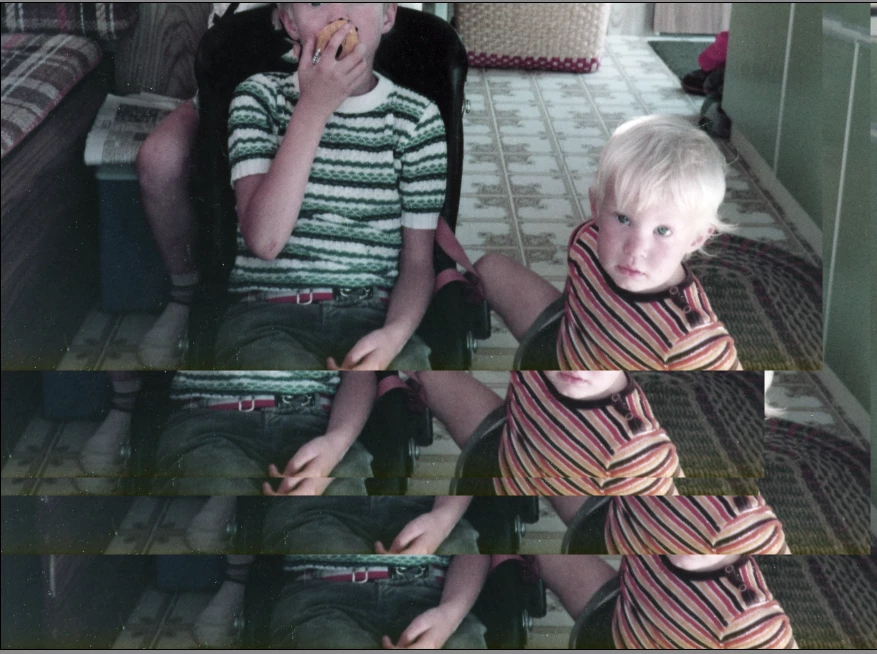
It's happened a few times now.  Any ideas what causes it please?

    This topic has been closed for replies.
    Correct answer hatstead

    Have you opened the layers palette to have a look at whether or not there are several active layers ?

    4 replies

    Greg_S.
    Community Expert
    Community Expert
    July 19, 2021

    @Second Holly, you are describing what happens when you have been using the clone tool.  In the following screenshot, I have used the clone tool to alt-click on the face with a large brush, then switched to another photo.  The copied/cloned face remains in the clipboard and is available to paste in the other photo. 


    And the Clone Overlay is shown and set to 100% opacity.


    Glenn 8675309
    Legend
    July 19, 2021

    I've actually had this happen to me about a week ago- I figured I did it acidently with some crazy keyboard short cut.  I just closed the program, and reopened, no problemo.  


    Participant
    July 19, 2021

    I shut down, went back, no change. I shut down, re-booted, no change. Finnally I changed nearly setting in the Healing Brush tool, and I think I accidently fixed it.  Did so many changes that I can't tell which one fixed the problem. Thanks for your reply.


    Glenn 8675309
    Legend
    July 19, 2021

    Ctrl + J is the keyboard shortcut to duplicate a layer.

    Participant
    July 19, 2021

    Same problem, no layers. Win 10 up to date, HP all-in one with I9. Additionally if this condition occurs and I open another file, the moving (with mouse) image is on the newly opened image.  Per another forum suggestion, I reset the tool, in fact all tools, no change.  After resetting tools, I even re-booted, no change. Started out of the blue, PSE user since version 6, quite experienced. Adobe support won't talk to me, how wonderful is that?!!

    Participant
    July 19, 2021

    Thanks so much, the light turns on .

    hatstead
    hatsteadCorrect answer
    Inspiring
    February 23, 2017

    Have you opened the layers palette to have a look at whether or not there are several active layers ?

    PaulFBarrett
    Known Participant
    February 23, 2017

    Yes there were.  But, I was in guided mode, using the spot healing brush, so how on earth could new layers (3 x background copies and 1 x Layer 1) have been created?  I didn't go anywhere near layers.  At least not consciously.  Is there a keyboard and mouse combo that adds a new layer?  Perhaps I hit that combo accidentally.

    Paul