March 17, 2017
Answered

Where are my actual photo files?

  • March 17, 2017
  • 1 reply
  • 626 views

I don't want to use Photoshop Elements and the Organizer any longer.  It regularly freezes and is very frustrating.  Where are my actual photo files located so that I can access them without using Photoshop?

    This topic has been closed for replies.
    Correct answer MichelBParis

    shraddhaj3923389  wrote

    Hi,

    Apology for the inconvenience caused.

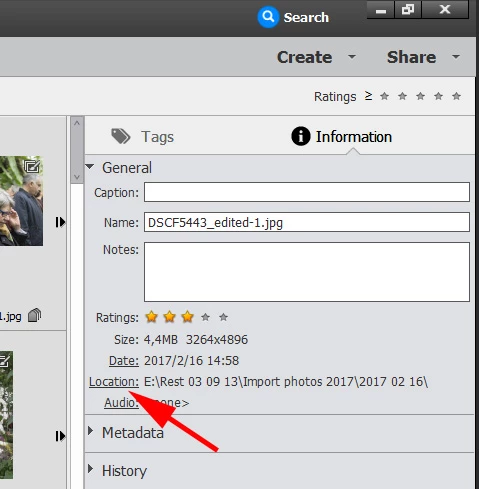
    The location of the media can be located from EO.

    • Go to media room, select a media->Go to left information panel

    It's on the right...

    That said, the question is how did those pictures land on your computer?

    - general case: you use the 'Import' module of the organizer to download the pictures to the drive(s) of your computer. That module lets you choose the location (folder) on your drive. If you ignore it, by default, the files will be downloaded to a default folder under 'My Pictures' for example; that location is indicated by the information panel as indicated by Shradda.

    - Or your photos have been put somewhere on your drive by any other way: download from the explorer/finder, by the camera software, by import from Internet or copy from a thumbrive etc. Then only YOU knows where those picture files have been imported. The catalog will show you the location in the information panel.
    1 reply

    Adobe Employee
    March 17, 2017

    Hi,

    Apology for the inconvenience caused.

    The location of the media can be located from EO.

    • Go to media room, select a media->Go to left information panel
    • Click on location, it will redirect you to the location of media

    To locate the whole folder, you can choose folders from left panel in media room.

    Right click on folder of which location you want to visit -> Choose reveal in finder/Reveal in explorer.

    We can help you out with issue you are facing please tell us the steps which leads to freezing of EO with OS version and EO version.

    Thanks,
    Shraddha

    MichelBParis
    MichelBParisCorrect answer
    Legend
    March 17, 2017

    shraddhaj3923389  wrote

    Hi,

    Apology for the inconvenience caused.

    The location of the media can be located from EO.

    • Go to media room, select a media->Go to left information panel

    It's on the right...

    That said, the question is how did those pictures land on your computer?

    - general case: you use the 'Import' module of the organizer to download the pictures to the drive(s) of your computer. That module lets you choose the location (folder) on your drive. If you ignore it, by default, the files will be downloaded to a default folder under 'My Pictures' for example; that location is indicated by the information panel as indicated by Shradda.

    - Or your photos have been put somewhere on your drive by any other way: download from the explorer/finder, by the camera software, by import from Internet or copy from a thumbrive etc. Then only YOU knows where those picture files have been imported. The catalog will show you the location in the information panel.

    March 17, 2017

    Thank you. I found the photos.