
Known Participant
March 23, 2023
Answered

Where are my photos being imported to?

  • March 23, 2023
  • 1 reply
  • 504 views

I am at a loss. I have imported several thousand, probably 50,000 or more photos in the last several years and just ran into this issue. Trying to import any photo. The first thing I notice is that when I open Elements 18 it is showing me all the photos that are in my catalogs BUT when I go to "Get Files and Videos" and then "From Files and Folders" I select the photo I have in the file and it then says "1 Media item was imported" BUT I am not seeing the photo. In the past it usually shows up all by itself so I can work on it but now, for whatever reason, all my photos are showing up except the one I am trying to import. It is happening for any photo I try to import now. Just started today. I have shut the program down. I have rebooted my computer. I don't know what else to try. Any help will be much appreciated. This is a Windows 10 machine.
This topic has been closed for replies.
Correct answer Greg_S.

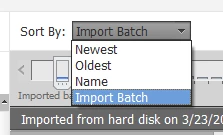
Use the Sort By: drop down menu to sort your photos by Import batch.  Then press the Home key and your latest import should appear at the top of the grid.

1 reply

Greg_S.
Community Expert
Greg_S.Community ExpertCorrect answer
Community Expert
March 24, 2023

Use the Sort By: drop down menu to sort your photos by Import batch.  Then press the Home key and your latest import should appear at the top of the grid.

jmillspAuthor
Known Participant
March 24, 2023

That sure works! Thanks! The thing I can't figure out is why it started not showing me the latest photo but today, is a new day and everything seems to be working as it should again. I was able to upload 4 photos and they showed up as they usually do. I was on the verge of getting the latest copy of Elements. Maybe I still should?