
Inspiring
February 9, 2018
Answered

Where are PSE-2018 photo book pages stored on a Mac?

  • February 9, 2018
  • 1 reply
  • 440 views

How and where does the photo book feature in PSE-2018 store individual pages on a Mac? MichelBParis told me that

In Windows, the pages are stored as individual .psd files in a default Windows folder. If the process is similar in your Mac, you can recover all your pages, edit them individually and work like me to manage them in an album, sort them and export them to a final temporary folder.

I'd like to work as Michel does but on a MacBook Pro running 10.13.2. I’m dealing with the maximum # of pages (78) and I’m having trouble moving pages around to put into a different order. Can any Mac user help me out?
    This topic has been closed for replies.
    Correct answer Jeff Arola

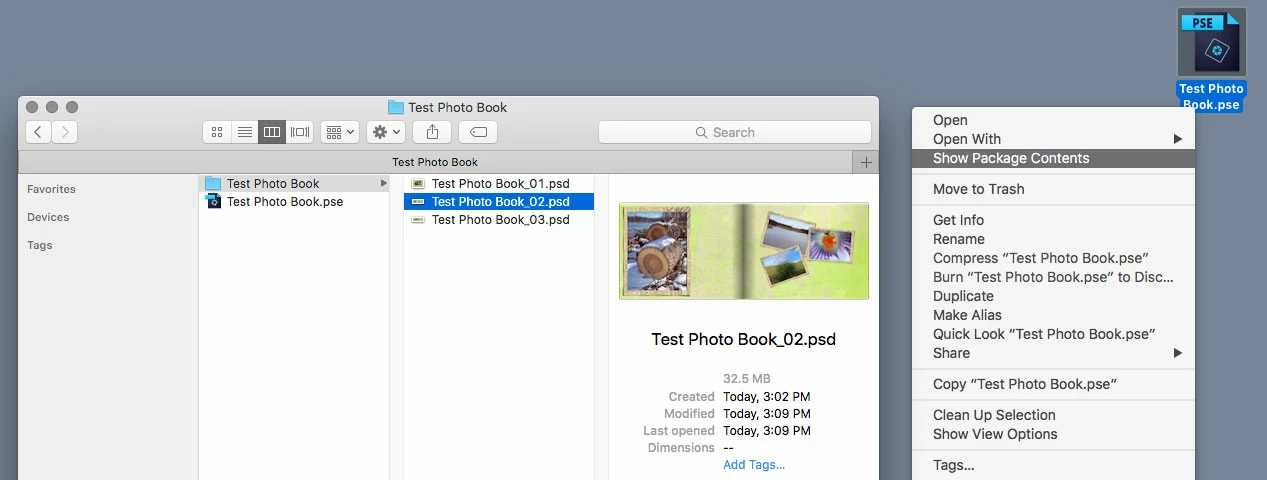
    Right click on the file you saved after completing the Photo Book, click on Show Package Contents and the individual pages are in a folder.

    1 reply

    Jeff Arola
    Community Expert
    Jeff ArolaCommunity ExpertCorrect answer
    Community Expert
    February 9, 2018

    Right click on the file you saved after completing the Photo Book, click on Show Package Contents and the individual pages are in a folder.

    Inspiring
    February 11, 2018

    Got it--thanks. Now, I'd like to move pages around to change the order and recreate the book with the new order?

    Currently in edit advanced mode, I can only move pages to and from the first 20 pages. My book is 70 pages long. If I try to move page 50 to page 40, the page can only be moved to pages below 20. Likewise if I try to move page 5 to page 40 it will only move to page 19--and no further. I guess I'm looking for a workaround so I can move pages anywhere and make my order decisions after I'm through editing everything.  Any ideas?