Participant
October 3, 2017
Answered

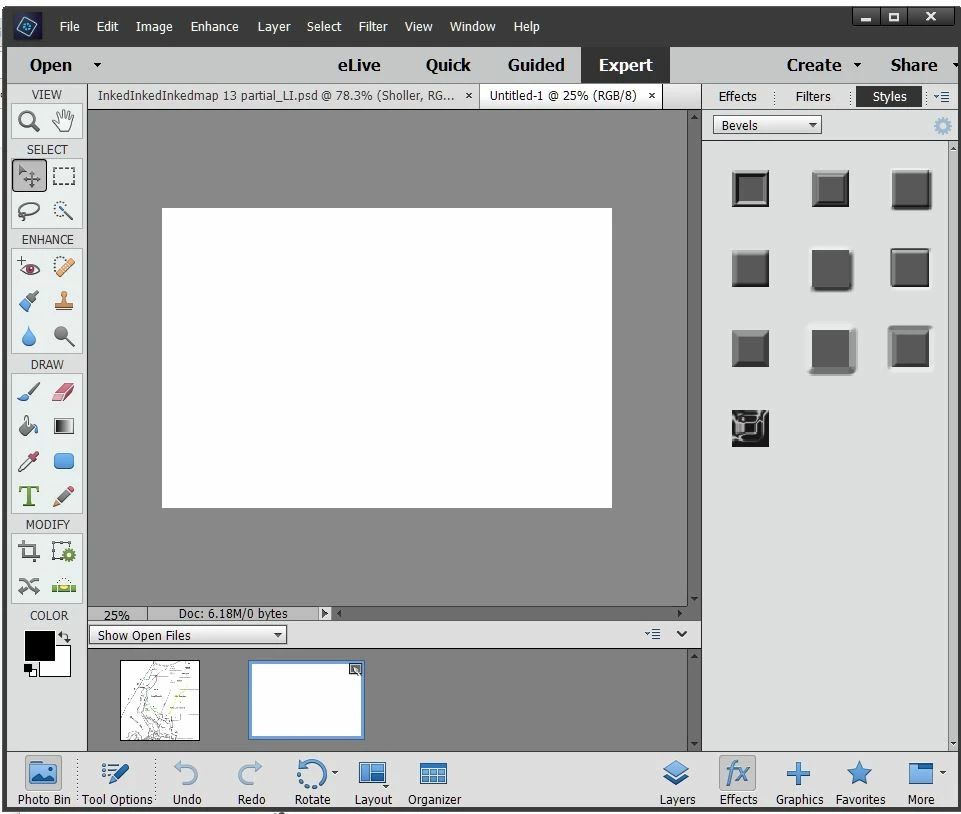
Where are the shape tools?

  • October 3, 2017
  • 1 reply
  • 1987 views

I can't find the tools to do shapes, lines, arrows, etc.  Screenshot of what I have attached.  I can't be this stupid can I?  PE 14.

    This topic has been closed for replies.
    Correct answer MichelBParis

    Use the shortcut 'U' and look at the tools on your bottom tool palette.

    The shapes tool is just right of the color picker in the 'draw' section.

    1 reply

    MichelBParis
    MichelBParisCorrect answer
    Legend
    October 3, 2017

    Use the shortcut 'U' and look at the tools on your bottom tool palette.

    The shapes tool is just right of the color picker in the 'draw' section.

    Participant
    February 20, 2021

    I see 4 shapes but where are the other shapes that are in the presets on the computer?  They are not displaying in photoshop elements and when you go to the presets in photoshop elements custom shapes does not display.  There is brushes, gradient, etc but not custom shapes

    Glenn 8675309
    Legend
    February 21, 2021

    You just need to select the custon shape tool (it's the "funny looking shape" ...  I manually install shape libraries, so my shape directory will look different than yours. I installed a 10,000 shape library just a couple of days ago.
