Participating Frequently
May 27, 2023
Answered

Why do my edited photos appear as a PS logo?

  • May 27, 2023
  • 8 replies
  • 1650 views

After I edit a photo it no longer shows up as a photo in my file. It shows up as a Logo which I have to click on to allow my photo to appear. When there are several edited photos I have to open each one to finally get to the one I am searching for.

Any ideas how to avoid this?

Thanks, Chuck

Correct answer Greg_S.

Perhaps we did not understand the problem accurately.  We need a screenshot of what you are seeing.


@chuckt68409253 said:  Why do my edited photos appear as a PS logo?  After I edit a photo it no longer shows up as a photo in my file. It shows up as a Logo which I have to click on to allow my photo to appear.


Since you only talked about the problem appearing after you edited the photo, I thought you may be saving the files in the PSD format and viewing the files in Windows Explorer.   In such a case, you would be seeing icons like this:
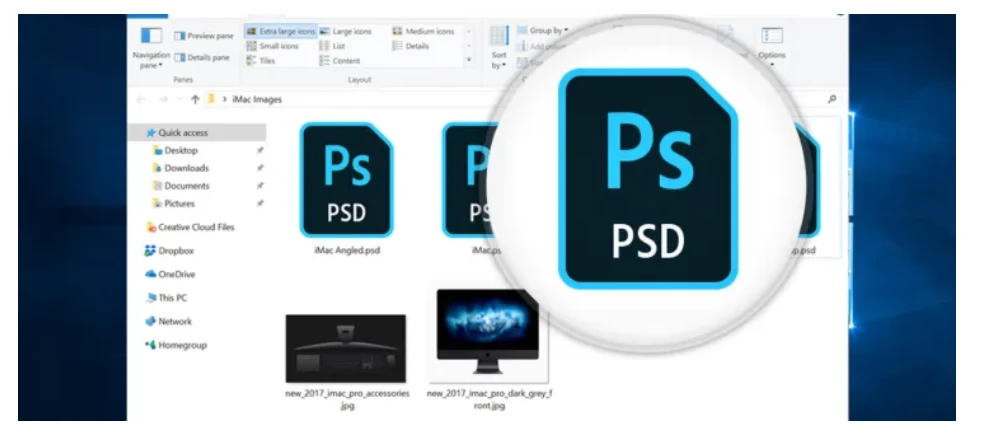


Now, you have told us that the problem appears in the Organizer, and that everything appears to be OK when you (double-?) click on the icon.  That suggests to me that the problem is the thumbnail not drawing until it is refreshed.  However, there are other possibilities, which is why I am asking you to post a screenshot of the icons. 


If it is a refresh problem, try selecting several of the icons and hitting Ctrl+Shift+U.  All of the thumbnails should now appear.



8 replies

Greg_S.
Community Expert
Community Expert
June 1, 2023

Chuck, your screenshot confirms what I suspected in my original reply.  When you edit your photos and save them, they are being saved as PSD files.  (PSD stands for Photoshop Document.)  Because the saved files are in this special format, you will only see the PSD icon when viewing the files in Windows File Explorer.  As I mentioned, there are some free utilities that allow you to view PSD files as photo thumbnails in Windows Explorer.  But your best bet is to use the Organizer to view your photos.


You may also want to consider saving your edited files as .jpg or .tiff files (using File>Save As in the Editor).  In the Save As dialog, you can choose to save the files in the Organizer in a version set, so that you have both the original file and the edited one in a stack.  Note that a layered file cannot be saved in .jpg format and will lose any layers.


I also note that you have file extensions hidden in Windows File Explorer. So this may contribute to your confusion about the icons.


As for the Update Thumbnail shortcut command that I gave you (Ctrl+Shift+U), it is also available under the Organizer's Edit menu.


Hope this helps.

Participating Frequently
June 1, 2023

Greg, the Ctrl+Shift+U worked. Nice clue if I can just remember to use it each time. 🙂

Thanks, Chuck

Greg_S.
Community Expert
Community Expert
May 31, 2023

Also, please tell us which version of Elements you have.

Participating Frequently
June 1, 2023

Hi Greg. Thanks for getting back to me. You can see below the Icons are "hiding" the photos and need to be opened one at at time when I searching for a specific one. In this case I started in PS Editor and pulled up the file those photos were in. If I start in PS Organizer I don't have this problem initially; however if I want to do addition editing the same problem comes up again.

Greg_S.
Community Expert
Greg_S.Community ExpertCorrect answer
Community Expert
May 31, 2023

Perhaps we did not understand the problem accurately.  We need a screenshot of what you are seeing.


@chuckt68409253 said:  Why do my edited photos appear as a PS logo?  After I edit a photo it no longer shows up as a photo in my file. It shows up as a Logo which I have to click on to allow my photo to appear.


Since you only talked about the problem appearing after you edited the photo, I thought you may be saving the files in the PSD format and viewing the files in Windows Explorer.   In such a case, you would be seeing icons like this:


Now, you have told us that the problem appears in the Organizer, and that everything appears to be OK when you (double-?) click on the icon.  That suggests to me that the problem is the thumbnail not drawing until it is refreshed.  However, there are other possibilities, which is why I am asking you to post a screenshot of the icons. 


If it is a refresh problem, try selecting several of the icons and hitting Ctrl+Shift+U.  All of the thumbnails should now appear.


Participating Frequently
May 31, 2023

Hi Bob and Greg.

Thanks for your help on this. Sadly, I spent a couple of hours trying to make suggestions work and have had not much success.


Greg, in Elements Organizer my edited photos still appear as PS icons. I can click on each one to open them but when I'm dealing with lots of photos and searching for a certain ones, I can't see the photos, only the PS icons.  I've had some luck with 3rd party programs. For example when I open a file containing PS edited photos in an old 2006 version of Microsoft Digital Imaging Suite they do show up as photos which is good. I also have a fairly old Canon program too but it only sporadically.


Bob, Your direction were very clear and I was able to follow even though I have Windows 11. When I got to Advanced Settings the "Always show icons, never thumbnails" was already unchecked.I went ahead anyway and clicked on Apply and then OK. Still no change.


Anyway, thanks again for helping.  I think I must be doing something fundamentally wrong but can't put my finger on it.

Cheers, Chuck

Participating Frequently
May 27, 2023

Thanks  Bob and Greg. I will try both ideas.

Peru Bob
Community Expert
Community Expert
May 30, 2023

Let us know what you find.

Participating Frequently
May 30, 2023

Will do. I should get to it Tuesday or Wednesday. 

Greg_S.
Community Expert
Community Expert
May 27, 2023

You are probably saving your edited files in the PSD format.  If so, Windows will not display the thumbnails in File Explorer.  I recommend that you use the Elements Organizer which will display your file thumbnails which can be zoomed to full screen. 


Alternatively, you will have to use a third-party utility. There are several free ones available.

Participating Frequently
June 1, 2023

What does the D in PSD stand for?

Participant
March 26, 2025

Document -  PSD stands for PhotoShop Document