
Participant
Jul 1, 2017 7:44 AM UTC
Answered

Why does it tell me the document is too big when it is not?
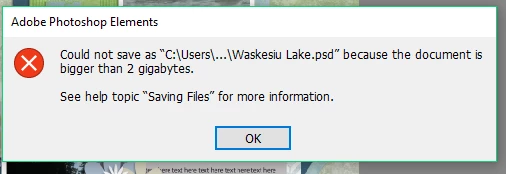
The file is 851.1M according to the document screen but I get the message that it could not save because the document is bigger than 2 gigabytes. I don't want to merge layers, simplify it or resize it because I want to edit the document but right now I can't save it. Any ideas?

    This topic is closed to new replies. Start a new post to keep the conversation going.
    Jeff Arola
    Jeff ArolaCorrect answer
    Community Expert
    Jul 1, 2017 9:58 AM UTC

    Try saving as a TIFF file.

    5 replies

    Participant
    Jul 19, 2018 12:25 AM UTC

    When this happens to me, I export the layers to files. (File>Export>Layers To Files).  This process usually isolates the layer or layers that are too big and I adjust accordingly.  Usually, it is a layer that is much bigger than what is shown within the frame of operation.

    Translate
    MichelBParis
    Legend
    Jul 19, 2018 8:24 AM UTC

    weswood  wrote

    When this happens to me, I export the layers to files. (File>Export>Layers To Files).  This process usually isolates the layer or layers that are too big and I adjust accordingly.  Usually, it is a layer that is much bigger than what is shown within the frame of operation.

    That's a Photoshop option. Not available in Elements.

    I would suggest starting a new discussion with a max of details for each individual case. It's practically never the 'same for me' situation.

    Translate
    Jeff Arola
    Community Expert
    Community Expert
    Jul 1, 2017 9:33 AM UTC

    Normal psd files are allowed 2gb in file size.

    In photoshop elements if you go to Edit>Preferences>Saving Files and set Maximize PSD File Compatibility to Never that should hopefully get the file size under 2 gb,

    Maximize PSD File Compatibility saves a merged copy along with the normal psd for backwards compatibility with older photoshop elements versions or to enable non adobe apps to open the psd and can often double the file size of the saved psd.

    You should also be able to save the document as a Tiff file, since Tiff supports file sizes of up to 4 GB.

    The document size you are referring to inside photoshop elements is an estimate and i don't believe it takes into account things like maximize psd file compatinilty

    Anyway here's what the photoshop Help says about it

    Document Sizes

    Displays information on the amount of data in the image. The number on the left represents the printing size of the image—approximately the size of the saved, flattened file in Adobe Photoshop format. The number on the right indicates the file’s approximate size including layers and channels.

    Translate
    belis2miAuthor
    Participant
    Jul 1, 2017 9:46 AM UTC

    I tried this just now but still get the same message about the file size being too large. Thanks for the suggestion

    Translate
    Jeff Arola
    Community Expert
    Jeff ArolaCommunity ExpertCorrect answer
    Community Expert
    Jul 1, 2017 9:58 AM UTC

    Try saving as a TIFF file.

    Translate