SurferAl
Known Participant
June 29, 2018
Answered

Why Does Save Act Like Save As?

  • June 29, 2018
  • 1 reply
  • 387 views

I open a PSD file, make a change, and choose File/Save. It then acts as if I've selected File/Save As. That is, I must choose the file and it warns me that I'm about to overwrite that file.

Am I misunderstanding that? Of the thousands of Windows apps I've used, none have acted like that.

Thanks.
    This topic has been closed for replies.
    Correct answer Jeff Arola

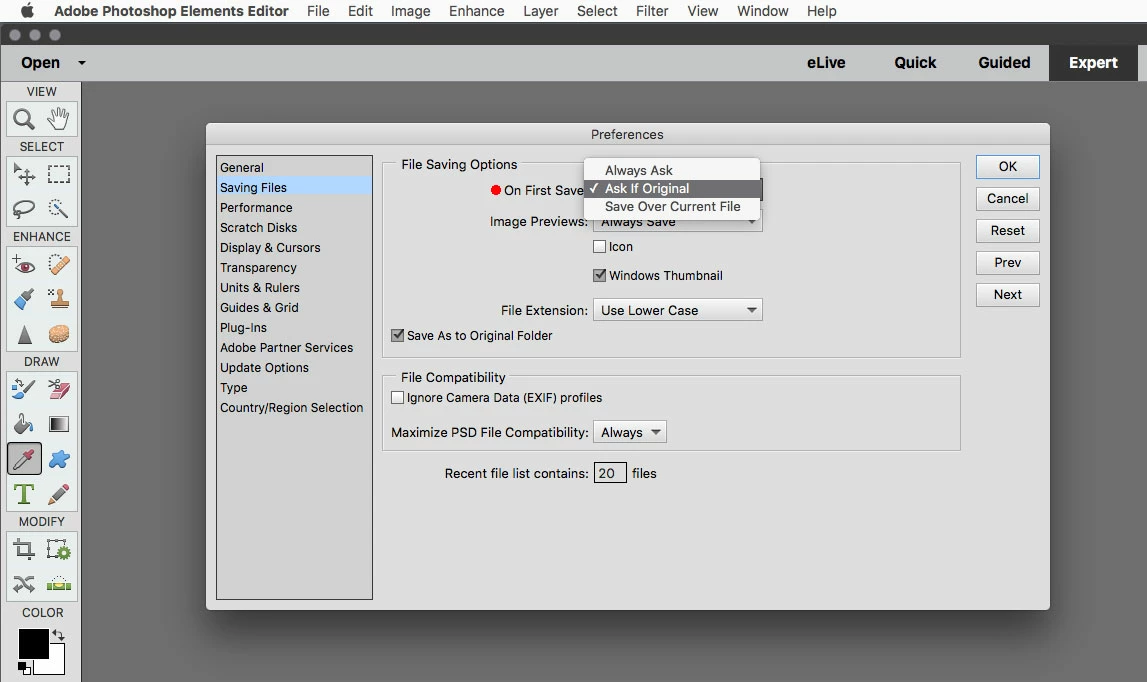
    Most likely the reason is the preference set in Edit>Preferences>Saving Files.

    1 reply

    Jeff Arola
    Community Expert
    Jeff ArolaCommunity ExpertCorrect answer
    Community Expert
    June 29, 2018

    Most likely the reason is the preference set in Edit>Preferences>Saving Files.