
Participating Frequently
April 1, 2017
Answered

Why doesn't the albums panel display after transferring PSE 12 to a new computer?

  • April 1, 2017
  • 1 reply
  • 270 views

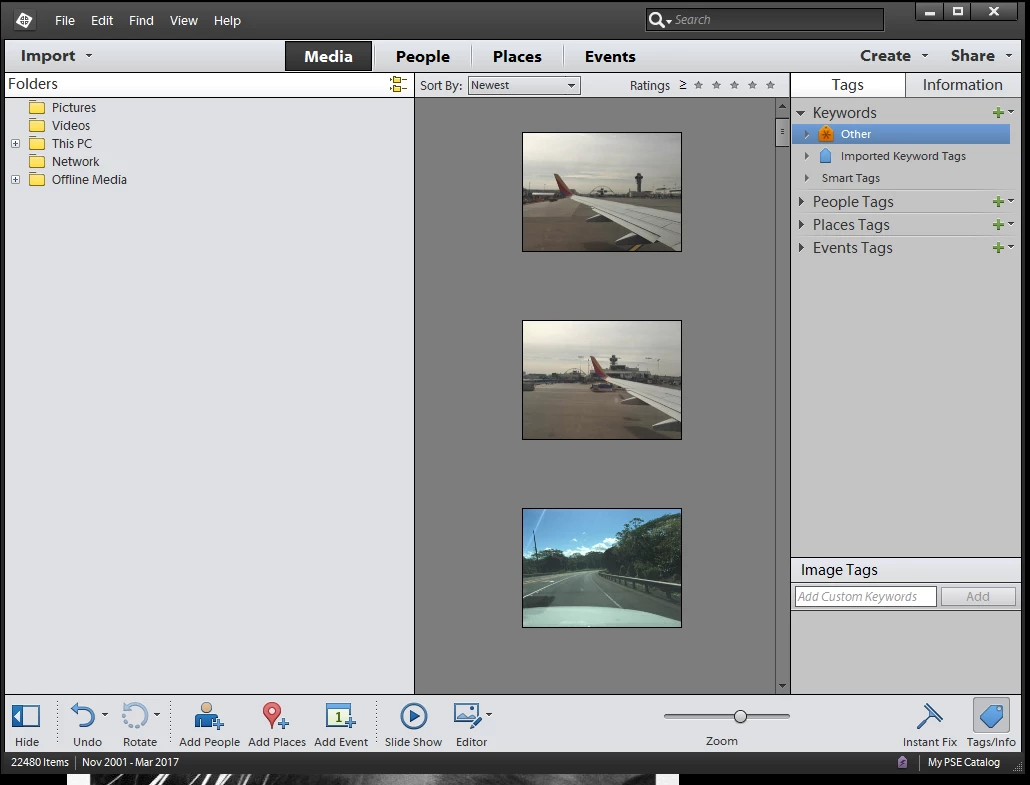
I can't find how to display the albums panel after I transferred my PSE catalog and photos to a new computer.  Both computers are running on Windows 10 and both computers have PSE 12 installed.  All the photos seemed to have transferred with their info and tags -- people, locations, event, captions etc.  I saw the album list once in the Organizer and moved one album using the dialog box.  Now I can't get back to it.
    This topic has been closed for replies.
    Correct answer MichelBParis

    That's unusual...

    Try clicking on the small yellow folders icon on the right of the title bar for Folders to see if the albums view is available.

    An organizer preference reset might be tried if that does not work.

    1 reply

    MichelBParis
    MichelBParisCorrect answer
    Legend
    April 1, 2017

    That's unusual...

    Try clicking on the small yellow folders icon on the right of the title bar for Folders to see if the albums view is available.

    An organizer preference reset might be tried if that does not work.

    Participating Frequently
    April 4, 2017

    You are right.  When you display the folders in the flat folder list, the Local and Mobile albums lists display.  When you display the folders in the hierarchal folder version, the albums lists go away.  You click on the small yellow folders icon to toggle between the two versions of displaying the folders list.  Makes no sense.