



Valentina ♡
Inspiring
Jan 16, 2024 4:40 PM UTC
Question

Why the preview of layers disappear?

Hi again, 
I have this question but I don't remember if it was solved yet.
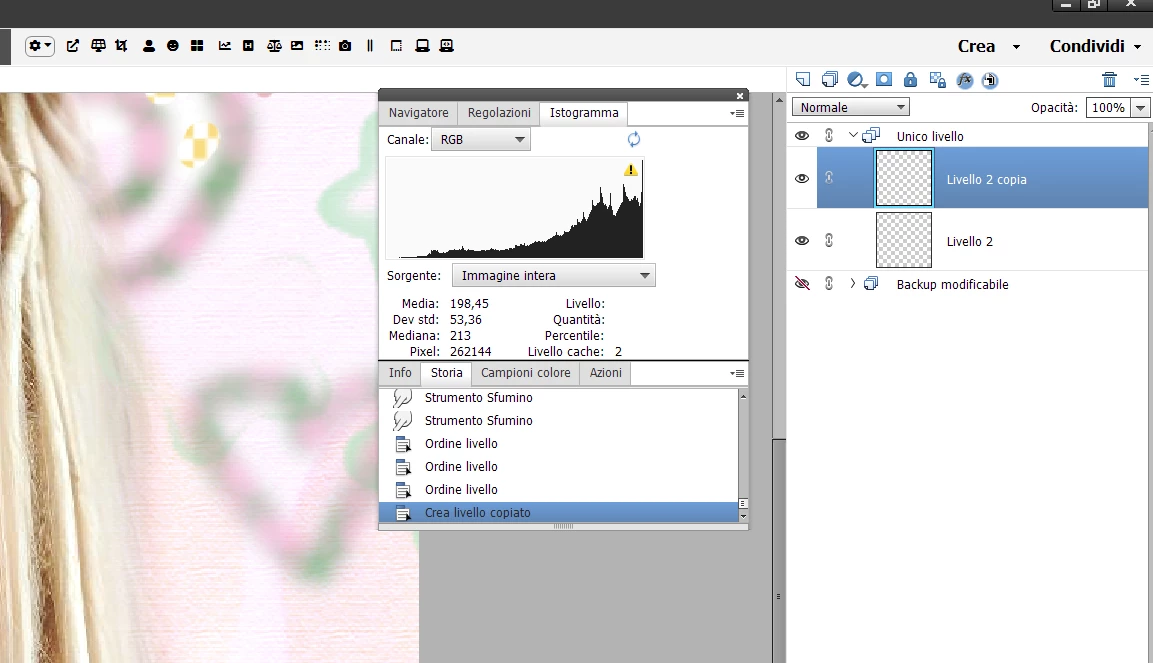
In my current workflow, I see this:
(the preview of the layers don't show up anymore). Do you know why, or if is a bug?


Detail:
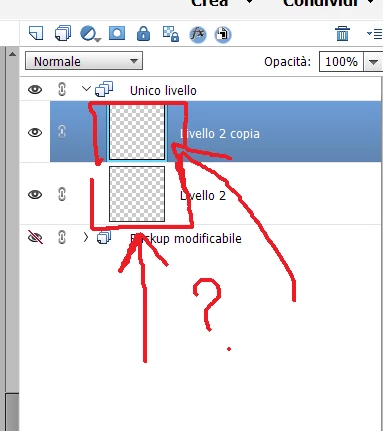


It's since I use Photoshop elements that happens this. At the beginning, I can see the preview of each layer, but after a while when I working, or make some 'merge', the preview disappear. 
Thanks again for the help in advance!


This topic is closed to new replies. Start a new post to keep the conversation going.

5 replies

Greg_S.
Community Expert
Community Expert
Jan 17, 2024 7:46 AM UTC

This is a known problem and I forget what the cause is or whether there is a fix for it. 


I don't know whether this will work, but try going to Edit>Preferences>Performance and change the setting for Use Graphics Processor for Improved Performance:


Translate
Valentina ♡
Inspiring
Jan 17, 2024 4:53 PM UTC

Thanks... I have already activated the option for use Graphic processor for improvements since when I had this problem, so I don't know what could be the problem. 
Today I re opened again my work and the preview of layers works again. So , who knows, maybe is the low memory ram after some hours to work with photoshop... I will try to see if it was this the case or because I did some other thing..

If someone knows also what could be this problem, please let us know again,

thank you again for the help!


Translate
hatstead
Inspiring
Jan 16, 2024 9:43 PM UTC

The print screen shows the layers are transparent.

Start over again with an image, and the Background layer (in the layers palette) should show visible content.

Translate
Valentina ♡
Inspiring
Jan 17, 2024 12:50 AM UTC

Sorry I didn't understand well in which sense, starting with an image and background in the layer palette? What is layer palette?
Thanks again for help!

Translate
hatstead
Inspiring
Jan 17, 2024 1:47 AM UTC

Palette is a panel with layers.

Please review this:

Create layers in Photoshop Elements (adobe.com)

Translate