
Participant
December 17, 2023
Question

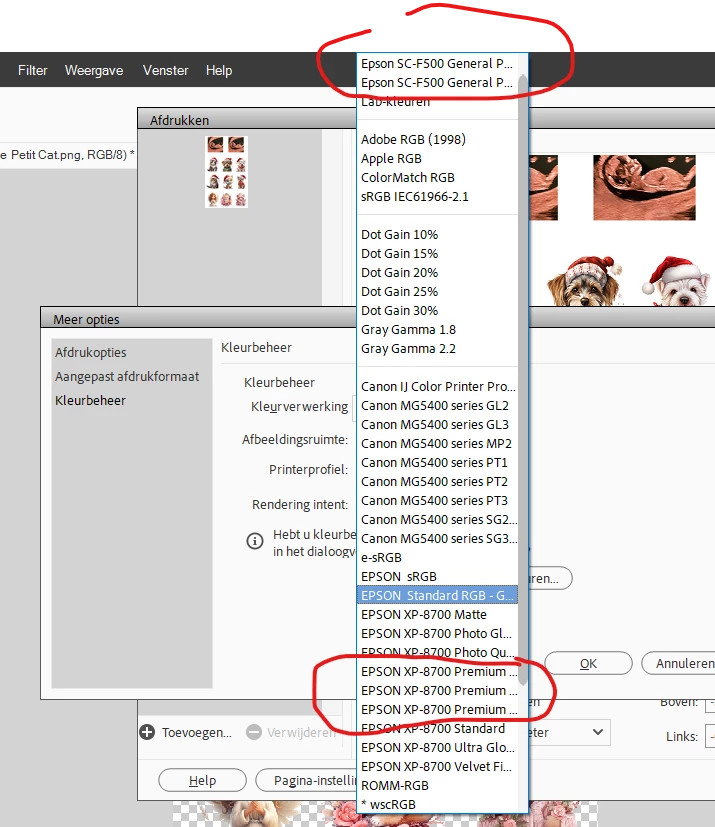
window for choosing icc printer profile is too narrow in elements 2024 - windows 11

  • December 17, 2023
  • 2 replies
  • 880 views

When I want to choose my printer (ICC) profile, the window is very narrow and I cannot see the complete name of the profile, since the ones I need start with the same words, I don't know which is the correct profile. I tried to change my language to English for the attached printscreen, but apparently that is not possible, so I try to translate it to English the best I can.

I am in print/choose printsize/custom to get to the colormanagment. I choose colormanagemant and than colormanagement by photoshop elements and when I try to choose the colorprofile it is a gamble for me. Any tips on how to rename the ICC profiles to make it easier or how to widen the window? I have this problem wih both my epson printers,

thank you
This topic has been closed for replies.

2 replies

Jeff Arola
Community Expert
Community Expert
December 26, 2023

Looks to me like a bug in photoshop elements 2024.


Compare the width of the menus between photoshop 2023 and 2024.


photoshop elements 2023


photoshop elements 2024


hatstead
Inspiring
December 18, 2023

Don't enable both Photoshop Elements and  the Epson printer to manage colors. I have an Epson printer as well., and my setup is for PSE to manage colors. I use PSE2024, but the procedure has not changed over recent upgrades.

1. Go to Image menu>Convert Profile. In the drop-down you can convert to RGB or to sRGB. I use the latter.

2. Go to File>print. In the print dialog click on "more options." Next click on Color Handling, and select PSE manages colors.

3. The point is not to enable both PSE & the printer managing colors. 


Participant
December 18, 2023

Thank you for the information, but I am famililair with that. In my printerdriver the printer is set not to manage colors, I only use photoshop to manage the colors, but if you choose photoshop to manage, you can/have to chose the ICC profile that photoshop uses. My previous printer only had one ICC profile, so there was really no problem. But both my new printers have more than one ICC profile, so I want to pick the right one (they all give different results when printing), but because of the long names that don't fit in the small window, I cannot chose the right one for the task. I do sublimation and that means I sometimes have to choose the rigid profile and sometimes the textile profile.

hatstead
Inspiring
December 18, 2023

 Suggest that you contact Epson support for additional guidance.