
Participating Frequently
April 14, 2017
Answered

Windows 10 and PSE11

  • April 14, 2017
  • 16 replies
  • 11437 views

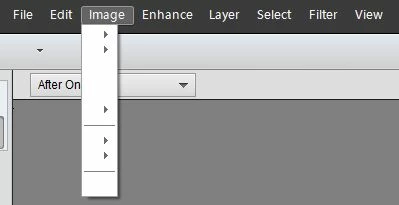
I just updated to Windows 10 Creator version and Photoshop Elements 11 is not working properly. Without getting into why I still use PSE11, the product has worked flawlessly since my first upgrade to Windows 10. My main issue is that the menus are missing any text. Anyone else experiencing this?
Thanks David

    This topic has been closed for replies.
    Correct answer georg_58

    I found a solution for the problem which is caused by Microsoft Win 10-CU:

    I copied ALL FONTS from the Windows folder of an "old" Windows 10 PC via USB stick to the PC with CU (Creators Update) / "no overwriting".

    Only a few of the great number of fonts have been copied - but the fonts needed by PSE 9, 10, 11, 12, 13, .... were included.

    Now it works - even after several reboots. I think it will also operate with the Windows 7 fonts.

    Problem with Win 10-CU seems to be that most of the fonts used by Adobe Products have automatically been deleted!

    (Thanks to

    16 replies

    PSE_stuff
    Participating Frequently
    May 20, 2017

    I did dome more digging today and have found several issues that might help shed light on the problem.

    The update from windows has removed a lot of fonts, it appears that this was by design but it has caused issues in several programs and for people using fonts that are not generic to windows. One part solution is to make sure that you have fonts installed for all languages as this adds some of the missing fonts back in, though not all. In particular the font Helvitica is missing. After doing some research it appears that this font is used by Adobe in its software and that fact that Windows has removed it may be part of the problem. Having said that, when you do a reinstall of PSE it will work until you shutdown and reboot your PC when it fails and at no point is the missing font added.

    Another issue with fonts is visible in the fonts folder for windows. Two fonts called 'Photoshop Large Standard' & 'Photoshop Small Standard' are shown as links, not fonts, and when you try to preview them they fail to appear and show an error message. However if you either manually install them or do a reinstall of PSE then they do appear correctly and can be previewed. It is only after the shutdown and reboot that they go missing again.

    Microsoft are aware of the fonts issues and have already partly addressed the situation so its possible that if this is the problem that they might fix it.

    It would be helpful if Adobe could confirm the fonts that they use as it might help us to track down the issue and help fix all the broken versions of PSE.

    deepop11Author
    Participating Frequently
    May 20, 2017

    Impressive research. Thanks for the update. Maybe there is some hope of a simple fix if Adobe and/or Microsoft is willing.

    PSE_stuff
    Participating Frequently
    May 15, 2017

    I don't believe that the DPI issue is related to this problem as other text within Adobe is not appearing that is not affected by the DPI changes. When you load the software and you get the splash screen with the modules loading and the names of the developers, that screen now has no text in it.

    The problem is more fundamental in the way that Adobe handles all text compared to other applications.

    As you said, the fixes for the DPI problems don't address this issue.

    Having seen the issues people are having with PSE15 and its instability with Windows 10 I am loathed to buy a copy, especially as PSE 16 is likely only a few months away.

    Participating Frequently
    May 15, 2017

    Yes, if the fix were as easy as buying the latest version of PSE, I would also purchase it to resolve this mess.  However, as you note, there are too many reports of problems with PSE15 running on WIN10 for me to make that jump.  Waiting for PSE16 is an option but I will need an alternative during the wait.

    I have version 4.4 of Lightroom but have never gotten at ease with it.  It may be time to watch a few tutorials and see if I can make do with it or something else.

    PSE_stuff
    Participating Frequently
    May 15, 2017

    Amazon are still selling PSE14 despite it not working on Windows 10 any more!

    I just spent 30 minutes using GIMP to do what normally takes 2 minutes in PSE12, having to learn a whole new set of buttons and keyboard shortcuts is a pain I could do without.

    The reviews of PSE15 on Amazon just go to show that it is not stable on Windows 10, I don't hold much hope out for PSE16.

    PSE_stuff
    Participating Frequently
    May 10, 2017

    So the same has happened to me, the update to windows on the 9th May fixed the issue until I rebooted for a second time and now the same error is back.

    Looking through Event Viewer I cant see anything different that windows did on the second reboot so some part of windows is resetting whatever is causing the error.

    I have a post on the Microsoft forum at https://answers.microsoft.com/en-us/windows/forum/windows_10-performance/photoshop-elements-12-stopped-working-after/0c4e286c-735c-45d8-872a-6b8c892c7b89

    It doesn't help much as Adobe says its Microsoft's fault and Microsoft says its Adobe's problem to fix.

    The more people that can alert both companies to the issue the greater the chance it might get fixed.

    I did wonder if the issue might be linked in some way to Adobe flash player as that was the only other update that is linked with Adobe. Microsoft have made changes to the way Windows interacts with Adobe Flash Player in the Creators Update.

    Participating Frequently
    May 10, 2017

    Windows Supersite discussed the cause of the problem the other day.  I apologize but I don't recall the details.

    Participating Frequently
    May 11, 2017

    FYI there was an Adobe Air update this morning, 11 May 17.  Unfortunately, it had no effect on the blank pull down menus.

    Participating Frequently
    April 30, 2017

    On my system, Organizer had tiny, unreadable fonts in its pulldown menus.  I clicked on what I hoped was "preferences;"  it took a couple of tries to get it right.  The Preferences box opened.   It appeared normal and was easily read.  I set the Organizer to use System Fonts and launched PSE 11, selecting Organizer.  I could now read the pull downs clearly.  That action however had no effect on the Editor module, which still has blank pulldowns. 

    Participant
    May 9, 2017

    The Windows update today seems to fix the problem with my PSE10 :-)

    deepop11Author
    Participating Frequently
    May 10, 2017

    Kaarloh,

    You are right!!! I just applied today's updates and PSE11 is working again.

    I went from 1703 Build 15063.138 to 1703 Build 15063.296

    In the KB I still did not see a mention of correcting any Adobe issues.

    PSE_stuff
    Participating Frequently
    April 20, 2017

    I have the same issue exactly. I tried an uninstall and reinstall of PSE11 but it did nothing to solve the problem.

    The windows 10 forum does not help as nobody else has mentioned the issue yet.

    This is the only program that has an issue on my PC after the windows creators update, I doubt that Microsoft will help fix it and the problem is marked as answered here on the Adobe forum.

    I have tried running PSE11 as administrator and using compatibility mode but neither have helped.

    Error log shows the following:-

    Faulting application name: PhotoshopElementsEditor.exe, version: 12.0.0.0, time stamp: 0x52251a2b

    Faulting module name: PhotoshopElementsEditor.exe, version: 12.0.0.0, time stamp: 0x52251a2b

    Exception code: 0xc0000005

    Fault offset: 0x010c76c0

    Faulting process ID: 0x48c

    Faulting application start time: 0x01d2b9f32c8ecf3c

    Faulting application path: C:\Program Files (x86)\Adobe\Photoshop Elements 12\PhotoshopElementsEditor.exe

    Faulting module path: C:\Program Files (x86)\Adobe\Photoshop Elements 12\PhotoshopElementsEditor.exe

    Report ID: c5d51c64-a643-411c-afc6-7c10e64e24b0

    Faulting package full name:

    Faulting package-relative application ID:

    The error code is related to an app no starting correctly, something in the windows update is preventing PSE11 from accessing and loading all the components it needs.

    PSE12 has the same issue.

    Can we get a response from Adobe as to if they are likely to look into the issue themselves, with it being their software and not Microsoft's.

    John T Smith
    Community Expert
    Community Expert
    April 20, 2017

    As far as I know, Adobe does not go back to work on old programs to make them compatible with new operating systems

    That work is reserved for new programs... and even there, Mac and Microsoft come out with so many updates that Adobe has a hard time keep their current programs up to date

    The current version 15 should work with the latest updates from Mac and Microsoft

    PSE_stuff
    Participating Frequently
    April 20, 2017

    I have asked a friend to check if his version has the issue as he has PSE15 and he has the same issue. Looking at the forums online it appears that problems also exist on Photoshop itself.

    As more people get the windows update I can see this becoming more of an issue.

    It looks like its time to move to other software that offers support.

    hatstead
    Inspiring
    April 14, 2017

    deepop11  wrote

    I just updated to Windows 10 Creator version and Photoshop Elements 11 is not working properly. Without getting into why I still use PSE11, the product has worked flawlessly since my first upgrade to Windows 10. My main issue is that the menus are missing any text. Anyone else experiencing this?

    Thanks David

    David,

    You may be able to get help on the Windows 10 forum.

    https://www.windows10forums.com/

    Let us know how you make out.

    deepop11Author
    Participating Frequently
    April 14, 2017

    Thanks Hatstead. I went to reinstall PSE and apparently there was a pending reboot so it forced a reboot. When it came back, all was normal again. Thankfully a false alarm!

    Participant
    April 19, 2017

    Reinstallation fixed this same problem in my case with PSE 10, too.