Participant
July 22, 2023
Answered

Workspace is too small in Windows 11

  • July 22, 2023
  • 1 reply
  • 455 views

I have recently downloaded PSE 18 to a new laptop and the screen layout is far too big (fonts, tools, rulers, pop ups). Is there anyway of resizing it so that the workspace is larger? Drop-down menus are the same as the OS (Windows 11) which is fine.

This topic has been closed for replies.
Correct answer Jeff Arola

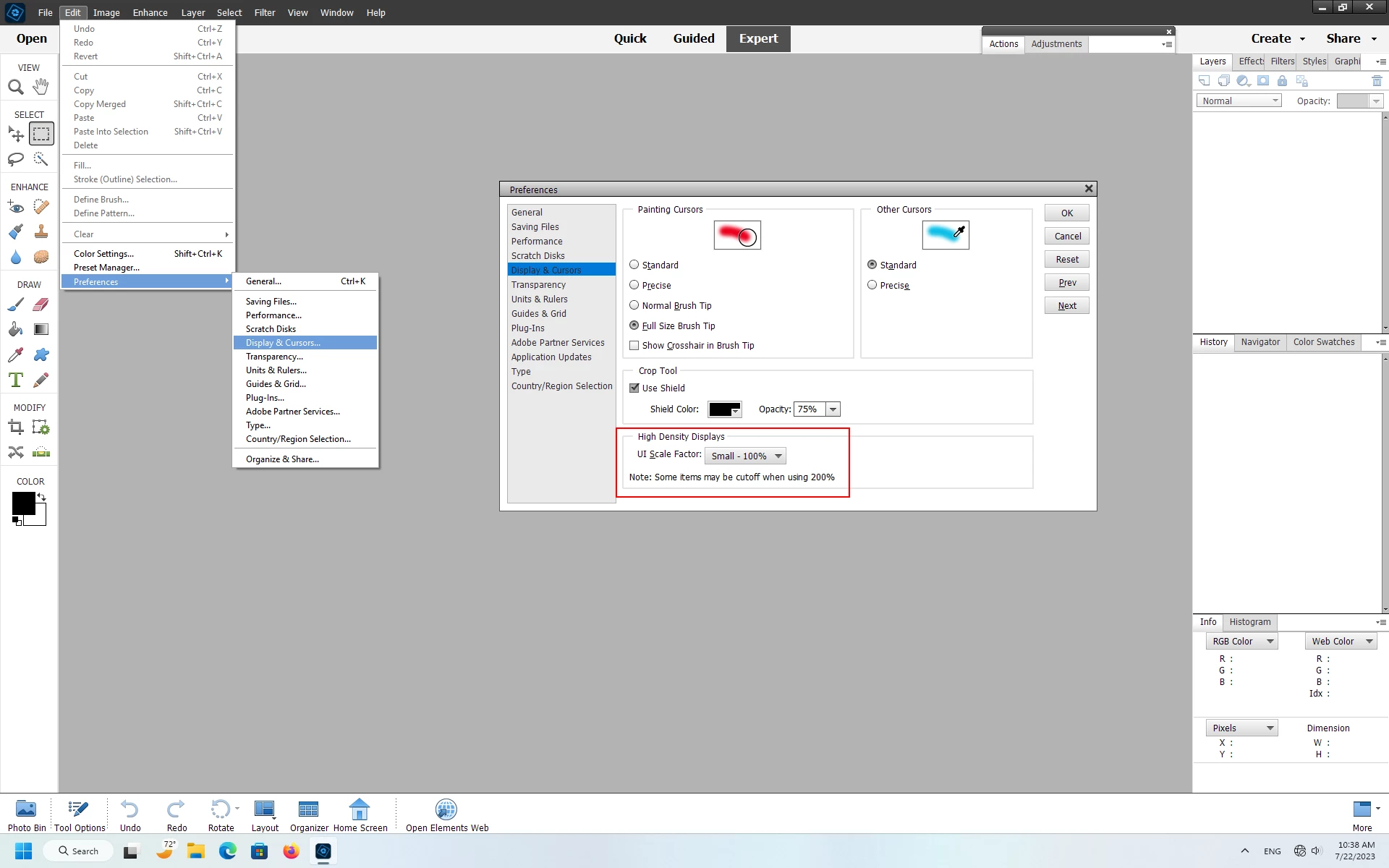
Yes in the pse editor go to Edit>Preferences>Display & Cursors, set the UI Scale Factor to Small-100% and restart the pse editor.
 

1 reply

Jeff Arola
Community Expert
Jeff ArolaCommunity ExpertCorrect answer
Community Expert
July 22, 2023

Yes in the pse editor go to Edit>Preferences>Display & Cursors, set the UI Scale Factor to Small-100% and restart the pse editor.


Participant
July 22, 2023

Brilliant! Dead easy, thank you so much.
