
Participant
March 19, 2023
Answered

Wrong version?

  • March 19, 2023
  • 3 replies
  • 1168 views

I recently bought Photoshop Elements 2023. Struggling to learn it I use Adobe´s help functions and Youtube tutorials. When opening up Elements I find menus and symbols partly different from those described i Adobe´s and Youtube´s tutorials. For example, up to the right there is no magnifying glass and no search bar where I could find the discovery panel. At the moment I am trying to remove the background of my photo. Here is a screen print:
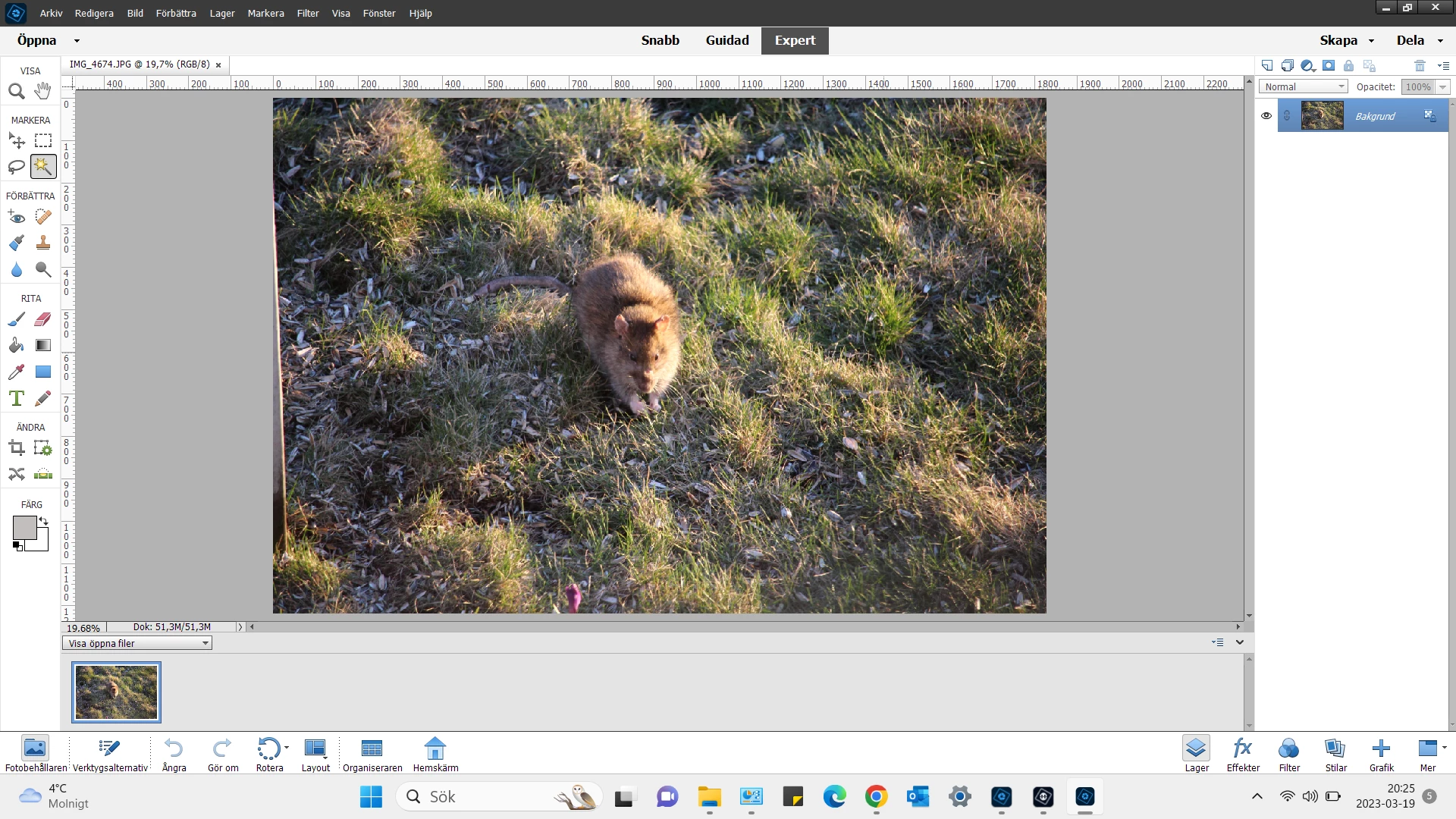
 Grateful for all kinds of help!

Yours Kjell
 

This topic has been closed for replies.
Correct answer 99jon

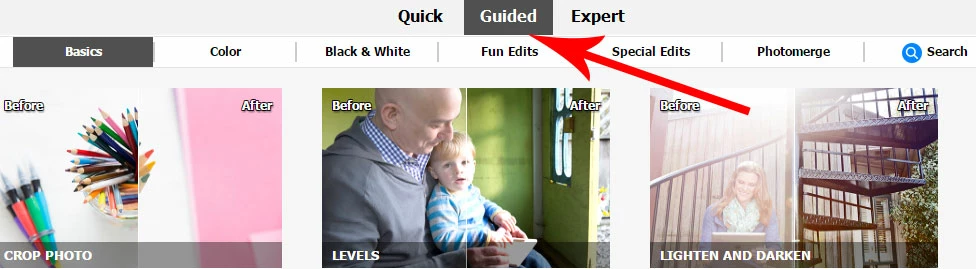
The main search function has always been in the PSE Organizer but Adobe introduced a new search function within “Guided” in the 2023 Editor.


The guided edits are step by step workflows. Many have simple one-click functions or use presets powered by A.I.   Try going to the Guided tab and clicking on the search button – see image below. If you type the word background into the search field you should find suggestions, including how to change your background. I have a YouTube video covering this subject, which may help.


3 replies

Greg_S.
Community Expert
Community Expert
March 20, 2023

Another Search box is found at the top of the initial Home Screen.  Type in a question and you will be given links to various resources.

Known Participant
March 21, 2023

I just discovered that and it works real well---thanks

Known Participant
March 19, 2023

My comment wont necessarily help you except maybe for moral support. I have 2022 and online full manuals for elements, phtoshop and organizer and encounter the same problems. I will look up a simple (for me) issue and the reading brings me down a rabbit hole and branches off into a dozen things that do not answer my question. Relying on the community is very helpful and watching you tube videos can be helpful also. But sometimes you want a quick  answer as you are working on something. So Ill try to chat and they switch you to 3 different people. Than you try to call and you wait for at least an hour and end up hangng up. Until I learn all of the tools and all of the ins and outs I will be frustrated. I wish I could take a real class with a real teacher. In any case this software involves a ton of time and if you are not a professional doing it everyday than good luck. 

Glenn 8675309
Legend
March 19, 2023

The videos you have been watching are for photoshop, not photoshop elements.

SELECT>SUBJECT it and paste into a new layer.   You may have to use the selection tool to get that mousy looking critter selected. 


Participant
March 20, 2023
Hello,

Thank you for replying to my question. I am a beginner an not used to the
teminology.

What you saw in my screen print was a jpeg photo. I opened it up in
Photoshop Elements 2023. As far as I can see the only function of the
magnifying glass you pointed out is to zoom in and out of the photo.

When you use the name "Photoshop" I suppose you refer to Premiere Elements.

Best regards

Kjell
99jon
99jonCorrect answer
Genius
March 20, 2023

The main search function has always been in the PSE Organizer but Adobe introduced a new search function within “Guided” in the 2023 Editor.


The guided edits are step by step workflows. Many have simple one-click functions or use presets powered by A.I.   Try going to the Guided tab and clicking on the search button – see image below. If you type the word background into the search field you should find suggestions, including how to change your background. I have a YouTube video covering this subject, which may help.