Nodope
Participant
February 14, 2021
Answered

Zuletzt verwendet löschen

  • February 14, 2021
  • 2 replies
  • 9537 views

Leider finde ich auch in Aktuellen Update 2021 nicht die Funktion um die Liste der "Zuletzt verwendet Dateien" zu löschen in der Deutschen Version. Adobe Photoshop Elements Version: 19.0 (20210126.m.155261) x64


Für jede Hilfe wäre ich dankbar.


Correct answer MichelBParis

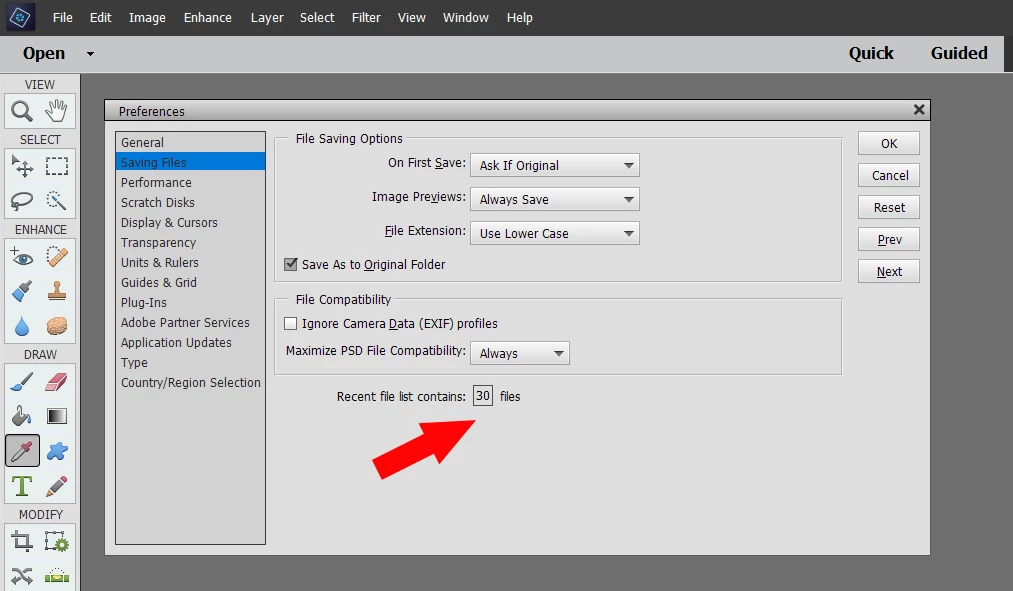
Set your preferences in the following menu:

Edit >> preferences, second options line, "saving" and choose the number of recently used files to keep.

I did a short test, and it seems that setting it to zero will do what you want.

(and don't hesitate to write in German: if other members don't understand it, they use the online translator).
2 replies

Participant
July 17, 2024

eigentlich ist die antwort simple ... 

Datei > Letzte Dateien öffnen > Liste der letzten Dateien löschen

😉

Greg_S.
Community Expert
Community Expert
February 14, 2021

I believe the list will be deleted if you reset the preferences file.  Go to Edit>Preferences>General tab and click the Reset Preferences on next launch button.  All other preferences you have chosen will also be deleted.


Nodope
NodopeAuthor
Participant
February 15, 2021

Thank you for your prompt reply.

But that's not quite what I was looking for. So i delete all my settings.I just want to clear the list. Best not to have it created.


Unfortunately I have the support search no solution found. 😞 


Sorry my bad english. 

MichelBParis
MichelBParisCorrect answer
Legend
February 15, 2021

Set your preferences in the following menu:

Edit >> preferences, second options line, "saving" and choose the number of recently used files to keep.

I did a short test, and it seems that setting it to zero will do what you want.

(and don't hesitate to write in German: if other members don't understand it, they use the online translator).
