


Participating Frequently
Feb 4, 2021 4:15 PM UTC
Question

Cannot update Premiere Elements

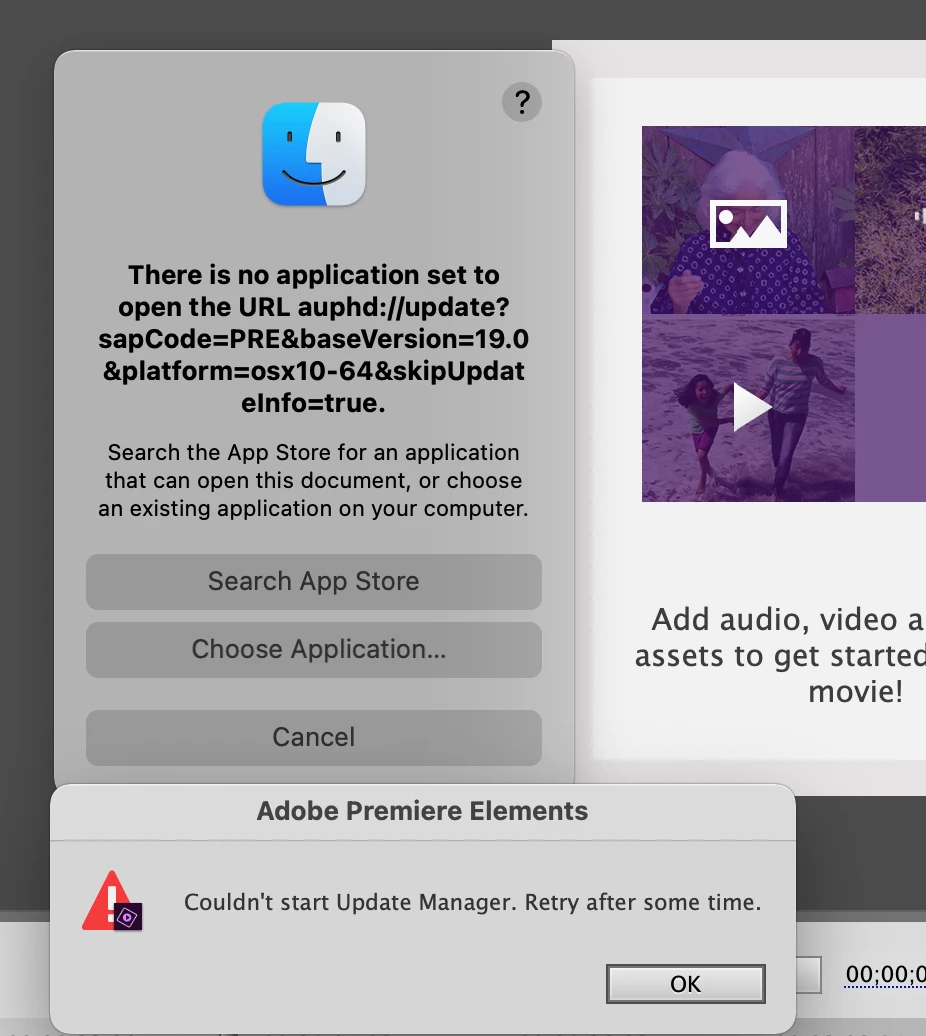
I'm trying to update Premiere Elements to the latest version. When I close the program and try to install the update I get the message 'Couldn't start Update Manager. Retry after some time'

I've been getting this message for a couple of days now. It's followed by 'There is no application set to open the URL auphd://update?sapCode=PRE&baseVersion=19.0&platform=osx10-64&skipUpdateinfo=true.'

I'm running on a 2020 IMac under BigSur. 

Many thanks

Chris 
This topic is closed to new replies. Start a new post to keep the conversation going.

21 replies

Participating Frequently
Feb 17, 2021 9:38 AM UTC

I tried the update again yesterday and it worked! No change to any software my end so maybe the missing URL has now been fixed.

Thanks

Chris

Translate
John T Smith
Community Expert
Community Expert
Feb 5, 2021 8:43 PM UTC

I made a full system drive backup just in case, and then another one for the update processed with no problems


Win10 64bit Pro 20H2

Intel i9-10900k CPU in ASUS-Prime-Z490-P motherboard with 64Gig TEAMGROUP-3200MHz ram
Seagate-FireCuda 500Gig M.2 for Windows and programs and the usual Documents files
500Gig SSD for temporary and output files, 1T SSD for video and picture input files
MSI GeForce GTX 1650 128 Bit Graphics 4Gig GDDR6 ram video card

Translate
John T Smith
Community Expert
Community Expert
Feb 5, 2021 7:26 PM UTC

>downloaded a fresh installation from


Hmm... I did that, and I'm thinking about running that installer (after I make a backup in case of a problem) instead of even trying to do the update from within the program


I've never done a full 'replace on top of' install before, so I hope that idea works

Translate
Community Expert
Feb 5, 2021 3:44 PM UTC

"Probably no help but my PE 2021 installation (on WIN10) updated without issue 2 days ago.."


That's good news.  Must be something screwy on my computer that made it balk.  It took a few extra steps, but mine is working well now. 


Translate
Community Expert
Feb 5, 2021 3:42 PM UTC

Medha,


I ran the log file creator this morning.  I cleared up the problem with a reinstall yesterday so would the data you need be there?  If so, where would you like me to send the file?


Bill

Translate
Medha_Sharma
Adobe Employee
Adobe Employee
Feb 8, 2021 5:56 AM UTC

Hello Bill,


Since the issue is resolved now, the log file won't be of much help. Thanks for your willingness in assisting us to debug this issue.


Regards,

Medha

Translate
Medha_Sharma
Adobe Employee
Adobe Employee
Feb 5, 2021 8:56 AM UTC

Hello,


Could you please use the log collector tool and share the logs with us? We'll have them investigated at our end.

How to use the Creative Cloud Log Collector tool (adobe.com)


Feel free to reach out if you have any further queries, I shall be happy to assist you.


Regards,

Medha Sharma

Translate
Participating Frequently
Feb 5, 2021 9:47 AM UTC

what email address should I use to send the .zxp file


Thanks

Chris

Translate
Medha_Sharma
Adobe Employee
Adobe Employee
Feb 5, 2021 10:09 AM UTC

I've sent you a private message with the details.


Thanks,

Medha

Translate
HOTELECHOMIKE
Inspiring
Feb 5, 2021 7:14 AM UTC

Probably no help but my PE 2021 installation (on WIN10) updated without issue 2 days ago when I started the tool.

Took about 10 minutes & then I had "Version 19.0" (which puzzled me as I would have expected 19.1) followed by "(20210127.daily.2235820)" which does appear to be the latest update.

Application is operating normally.

Translate
Community Expert
Feb 5, 2021 5:16 AM UTC

The update process locked my Windows 10 computer.   I got it unlocked with the Windows Task Manager (Ctrl+Alt+Del).   


Once unlocked, I  rebooted and uninstalled my existing version of PrE 2021.  Then I downloaded a fresh installation from https://helpx.adobe.com/download-install/kb/premiere-elements-downloads.html?promoid=D4P81Y6G&mv=other


Launching the installation put the newest "updated" version on my computer.  When opened it asked for the serial number.   I entered it and all is back to normal operation including the update.  


Translate
John T Smith
Community Expert
Community Expert
Feb 5, 2021 3:35 AM UTC

Send a message to https://community.adobe.com/t5/user/viewprofilepage/user-id/11071699 with your computer details and any message you see... Mohit is the employee who announced the update here

Translate
Community Expert
Feb 4, 2021 9:18 PM UTC

I'm on Windows 10.  There was not a specific error message.  I simply locked up the entire PC.  That's rare for me!


A complete uninstall with fresh install file put me on todays release of Elements 2021.1, Build: 20210127.daily.2235820.  It is working fine again. 

Translate
John T Smith
Community Expert
Community Expert
Feb 4, 2021 10:19 PM UTC

Hmm... I bought the disc from Amazon, so going to my registration and order history does NOT show a download link for the update


I haven't tried to update from within the program, and now I think I will put that off for awhile

Translate