Participant
May 24, 2017
Answered

how to make multiple videos out of one project?

  • May 24, 2017
  • 4 replies
  • 4631 views

Im wondering if there is a way to to cut a project up in to multiple videos? EX: say i have 15 video clips I start with to make one but then i want to split that into 3 parts instead of one big video. Is there a way to do that without deleting 2/3 of it, then doing 2 more projects and try to remember what clips i had.

thanks

    This topic has been closed for replies.
    Correct answer ajays74965046

    Hi,

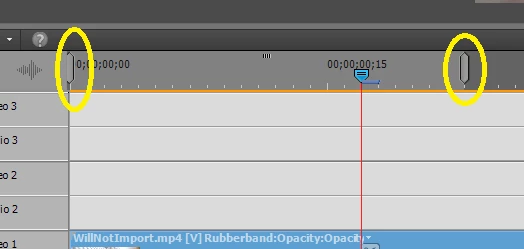
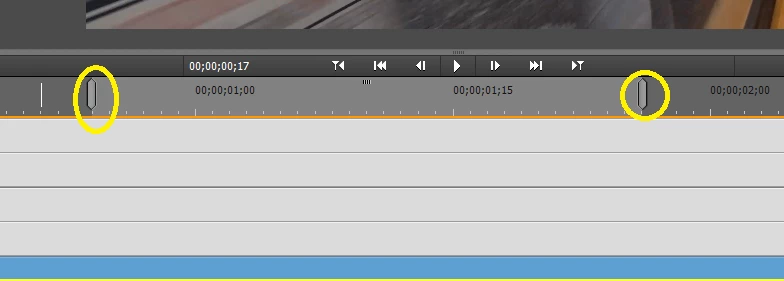
    If you intend to export a project in parts as a video file you can use the 'work area bars' using Expert mode as suggested by whsprague.

    These would be the two bars at the top of timeline which are set at the start and end of your project by default.

    Set the work area bars to the extent you need in each part.

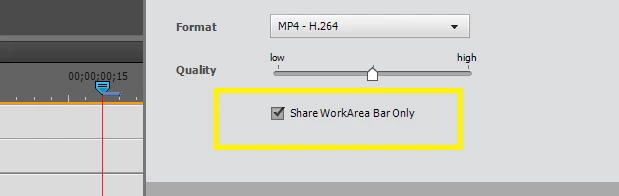
    Make sure while exporting the project you check the option saying 'share workbar area only'

    Hope it help.

    Thanks and regards

    4 replies

    Participant
    May 16, 2020

    THANK YOU ! ! !

    ajays74965046
    Community Manager
    ajays74965046Community ManagerCorrect answer
    Community Manager
    May 26, 2017

    Hi,

    If you intend to export a project in parts as a video file you can use the 'work area bars' using Expert mode as suggested by whsprague.

    These would be the two bars at the top of timeline which are set at the start and end of your project by default.

    Set the work area bars to the extent you need in each part.

    Make sure while exporting the project you check the option saying 'share workbar area only'

    Hope it help.

    Thanks and regards

    Participant
    February 13, 2020

    ajays74965046 I searched online for half a day before finding your beautifully simple explanation for how to do this. Thank you!

    HOTELECHOMIKE
    Inspiring
    May 24, 2017

    I'd copy the "big" project file (file type .prel) into three new project files and then in each one delete the parts you do not want.  They you can add differing titles etc as appropriate.

    Deletion is a lot faster than creation

    Participant
    May 24, 2017

    HOTELECHOMIKE​ good idea!

    whsprague​ not 100% sure exactly what you mean but im going to try.

    thanks  to both

    Community Expert
    May 25, 2017

    tripleA059  wrote

    whsprague  not 100% sure exactly what you mean but im going to try.

    On the timeline in the Expert mode are little blocks that normally mark the beginning and the end of the project.  They can be grabbed with the mouse and moved to where you want them.  In the output dialog there is a little box to check that will limit the output file to what is between the little "Work Area" blocks.

    Community Expert
    May 24, 2017

    Use the "work area bars" and check the block on output.