

Inspiring
July 18, 2026
Question

クリップを均等に秒数開ける

  • July 18, 2026
  • 4 replies
  • 19 views

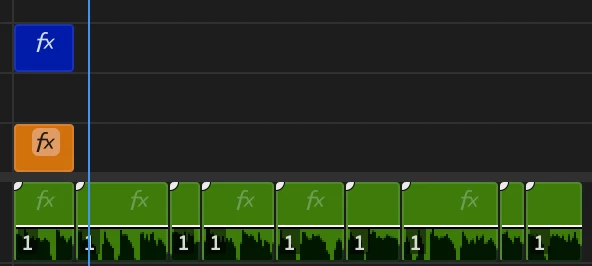
添付1の緑のクリップの箇所です。
音声を生成→premierに読み込むと各クリップがピッタリで配置してくれます。

ただ各クリップごと5フレーム分くらい間を開けたいのですが、一つずつ手作業でやるしかない現状です。
一括で行うことや効率化できることはありますでしょうか?
成功イメージは添付2枚目のようにしたいです。

 

    4 replies

    Community Expert
    July 18, 2026

    This can be done fairly quickly.

    1. Open any clip in the Source Monitor and set its In point and Out point so the clip is 5 frames long.

    2. If your audio is on track A1, set the source patching to track A2. See Add media to the timeline using source patching.

    3. For each clip, press the Comma key ( , ) to insert the 5 frame clip, then press the Down Arrow key to move to the next edit point.

    4. Repeat this until you reach the last clip.

    5. Select all of the clips you added on track A2 and press Delete.

    Mathias Moehl
    Community Expert
    Community Expert
    July 18, 2026

    This script inserts the selected project items into the active sequence with a gap of 5 frames:
     

    Just download the xml script here:
    https://www.dropbox.com/scl/fi/tnagbirr810w23lqqy1vc/Insert-Selected-Clips-Into-Active-Sequence-with-Padding.xml?rlkey=4jw0m4a130a5b0cn2nj1skum8&dl=0

    The you can open and run the script with my (paid) extension Automation Blocks. This also works with the free trial version.

    Mathias Möhl - Developer of tools like BeatEdit and Automation Blocks for Premiere Pro and After Effects
    Peru Bob
    Community Expert
    Community Expert
    July 18, 2026

    Automation blocks may be able to do that.

    @Mathias Moehl 

    Community Expert
    July 18, 2026

    I’m afraid that you’ll have to do it manually.