Vincent.
Inspiring
December 16, 2019
Answered

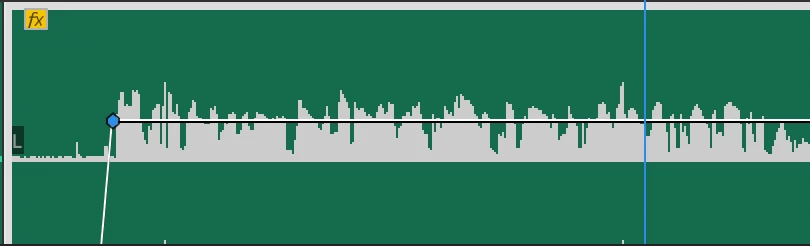
0db is above the middle line of the clip in Premiere Pro 2020

  • December 16, 2019
  • 2 replies
  • 632 views

Does anyone's PP 2020 look like this? It doesn't really make sense graphically; is it a bug? 
This topic has been closed for replies.

2 replies

Peru Bob
Community Expert
Community Expert
December 16, 2019

You are looking at the Rectified Audio option:


Toggle displaying rectified audio waveforms

  • Choose Rectified Audio Waveforms in the Timeline panel menu to show or hide this option.

Tip: Experiment with all the options in the Timeline settings menu and Timeline panel menu. You can always reset all Premiere Pro user preferences by holding Option (macOS) or Alt (Windows) when you start Premiere Pro.


from here:https://helpx.adobe.com/premiere-pro/how-to/working-with-timeline-panel.html

Meg The DogCorrect answer
Inspiring
December 16, 2019