
Participant
January 9, 2022
Answered

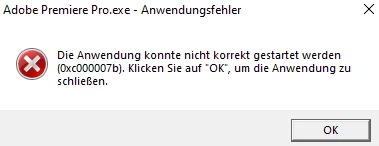
0xc000007b - Premiere Pro doesn't work

  • January 9, 2022
  • 2 replies
  • 796 views

In first i got a allert that MSVCR110.dll is missing. I replaced it. Startet all new. Deinstalled the wohle setting, Reinstalled all, Filled in new aso but than comes 0xc000007b - and now, it doesnt work, all other programms are running 


Can anybody help?


This topic has been closed for replies.
Correct answer Richard van den Boogaard

A google search tells me that this has something to with Microsoft Visual Studio: MSVCR110.dll is the Microsoft Visual C++ Redistributable dll that is needed for projects built with Visual Studio 2011.


See more details here: https://answers.microsoft.com/en-us/windows/forum/all/the-program-cant-start-because-msvcr110dll-is/f052d325-3af9-4ae5-990b-b080799724db


Hope this helps.

2 replies

Jeff Bellune
Legend
January 9, 2022

You may want to run the system file check utility to ensure all is well with your Windows installation.

Participant
January 11, 2022

Hy and Hello


Yes the last option is to reboot all. May It works after it. THe restoro is just a expensive methode to do it.

Richard van den Boogaard
Community Expert
Community Expert
January 9, 2022

A google search tells me that this has something to with Microsoft Visual Studio: MSVCR110.dll is the Microsoft Visual C++ Redistributable dll that is needed for projects built with Visual Studio 2011.


See more details here: https://answers.microsoft.com/en-us/windows/forum/all/the-program-cant-start-because-msvcr110dll-is/f052d325-3af9-4ae5-990b-b080799724db


Hope this helps.

Participant
January 11, 2022

Hy -. Thanks - sure I'm googeling now for days and I redo the MSVCR110.dll and --- the answer was your fu..ed up now I need the 0xc000007b so I rebuild the Computer with a "Wiederherstellungspunkt" - (System recovery) for more than 8 hours - but - NOTHING. The good payed program still standing on a hill and be a angry.

So at the Moment I follow your link and I use the RESTORO Program for repairing 0xc000007b. I hope it works.
Thank you for the link. 


(PS.: The files at the links are 9 years old...at this point I'm shy to use such things...)