
AJLeibman
Known Participant
February 9, 2024
Answered

1080p clip stays distorted on 4k sequence

  • February 9, 2024
  • 3 replies
  • 2136 views

Hello all, 
I'm editing a short video about an open-water swimmer who is blind. Everything was shot in 4k except one clip was shot in 1080p, which stays distorted on my 4k sequence or when I make a 1080p sequence. It is set to "set to frame" size and still is distorted in Premiere. However, it plays just fine in Quicktime, so I know the clip isn't corrupt. I gotta be overlooking something that's probably obvious . I've attached screen grabs from QT, distorted clip, meta data and media prefs. Thanks very much for any help! 
-AL 
This topic has been closed for replies.
Correct answer Ann Bens

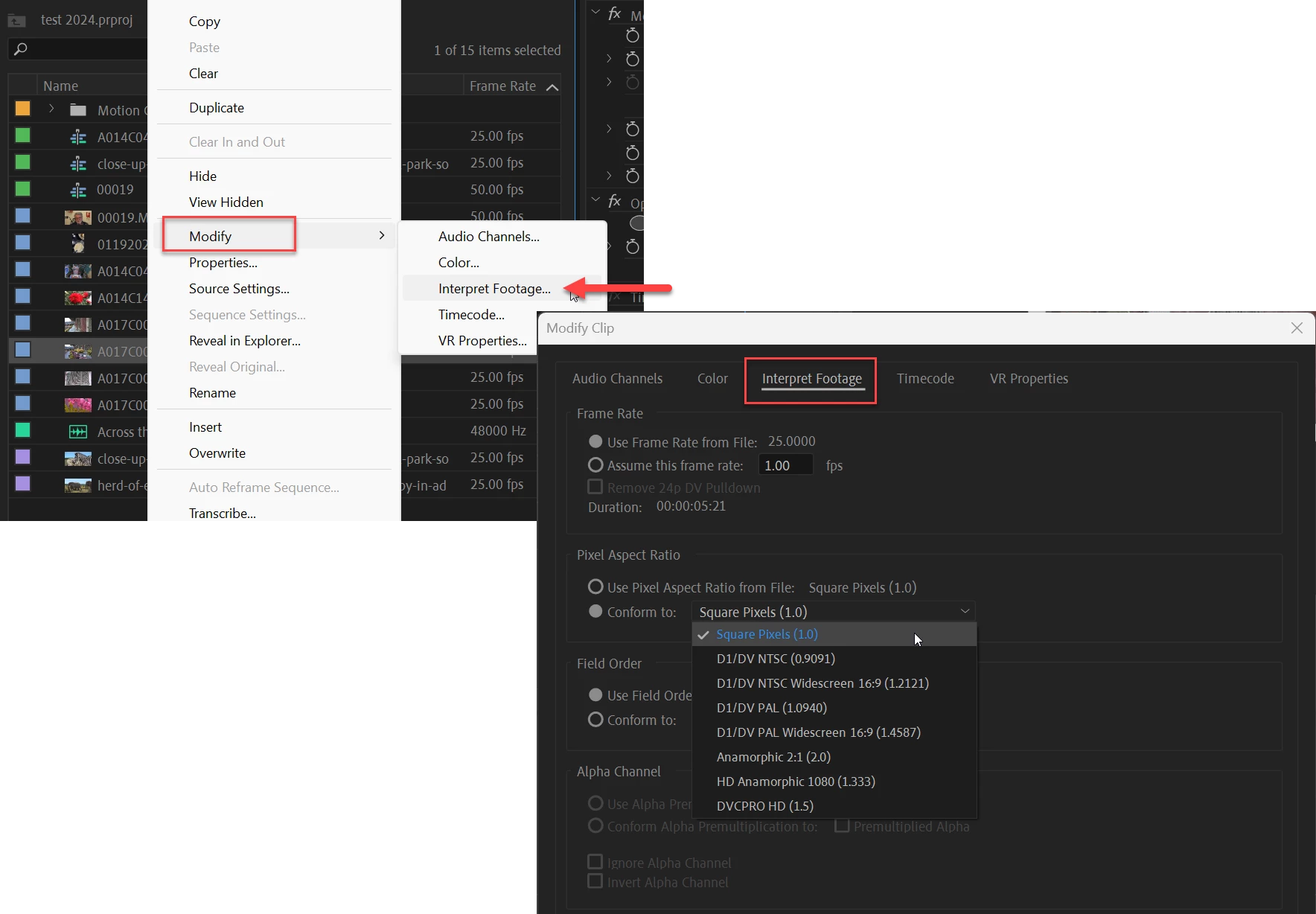
Yes, I understand. But how exactly do I do that? Thanks. -AL


Right click on clip


3 replies

Ann Bens
Community Expert
Community Expert
February 9, 2024

Your clip has an odd pixel aspect ratio as in 3.5556

It should read 1.0. (modify clip)

AJLeibman
AJLeibmanAuthor
Known Participant
February 9, 2024

Ann, it sounds like that might be corrrect. I know how to change the sequence settings, but how would I change the clip's aspect ration? Thanks. -AL

Peru Bob
Community Expert
Community Expert
February 9, 2024

What does it look like if you uncheck "Set to frame size" and manually resize it?

AJLeibman
AJLeibmanAuthor
Known Participant
February 9, 2024

Peru, I tried that, but the clip stays distorted. Thanks. -AL

Ann Bens
Community Expert
Community Expert
February 9, 2024

You do not change the sequence settings you modify the clip.

AJLeibman
AJLeibmanAuthor
Known Participant
February 9, 2024

I've attached on more screen grab of all the panels in the hope that could be helpful for any feedback.