Inspiring
November 29, 2020
Question

137 Hours to export a 1 hour 4k video? This is getting ridiculous... Please help

  • November 29, 2020
  • 2 replies
  • 492 views

This is being exported with the Pr Youtube 4k preset that comes with Pr. 16% room left on my hard drive.


Hard Drive: Seagate BarraCuda 6TB Internal Hard Drive HDD - 3.5 Inch SATA 6 Gb/s 5400 RPM 256MB Cache

GPU: RTX 2060 Super

System:
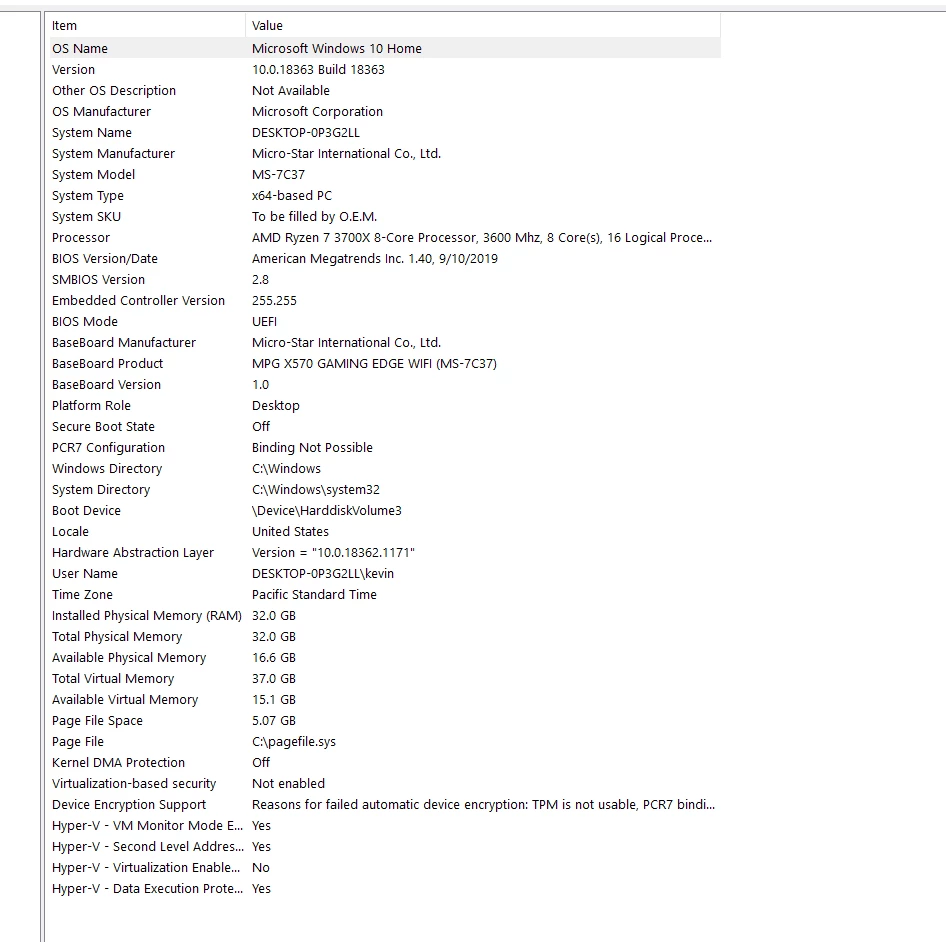
I have no idea what to do, but I know this isn't normal.

This topic has been closed for replies.

2 replies

Legend
November 29, 2020

Is that the ONLY disk that you have in your entire desktop PC? You see, a single HDD that's used for everything is woefully insufficient. In fact, performance-wise, that single HDD cannot sustain even 90 MB/s in overall disk I/O  throughput when tasked with simultaneous reads and writes. And since that disk is only 16% free, that concurrent disk I/O throughput drops even further - to around 32 MB/s! You need a second disk, preferably a solid state drive (SSD).

Inspiring
November 29, 2020

I have other disks - plus several new externals that have not been opened. My main OS disk is SSD, but that's all that's on there is my OS and software. I have another external SSD I could clear out and use solely for exports. Would that work? Or do I need to have the whole project on the SSD?

Ann Bens
Community Expert
Community Expert
November 29, 2020

Looks an awfull lot like this issue:

https://community.adobe.com/t5/premiere-pro/5-days-to-export-a-4k-9-hour-video-is-this-normal/m-p/11629373?page=1


You need to get yourself some decend hard drives as in SSD.

Inspiring
November 29, 2020

Is 16% free space on you HD enough? I don't know what codec you are using to render.

Inspiring
November 29, 2020

H264 1 pass 40mb. There's over a TB of space on the disk.