JRibb
Participant
December 22, 2017
Answered

4K to 1080 zoom and pan, how to do transitions?

  • December 22, 2017
  • 1 reply
  • 795 views

I've been using 4K video footage for my 1080/480 outputs (BD/DVD) and doing zoom and pans for my camera movements instead of a multi-camera setup. However, is there any way to do transitions or fake transitions? When I was doing multi-camera edits, I could do transitions between cameras. I know I could duplicate my footage and do a multi-camera edit to get my transition effects back, and then p&z.

Does anyone know an easier workaround to get a soft transition (like a cross-fade) between a zoomed out shot and a zoomed in shot?
This topic has been closed for replies.
Correct answer Meg The Dog

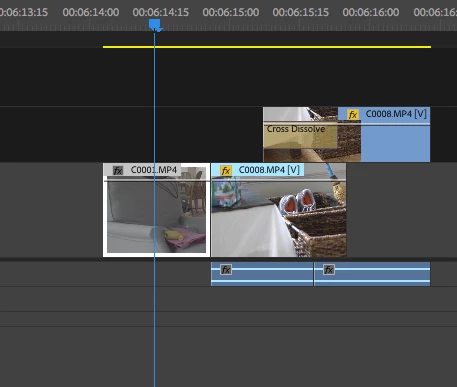
Put the incoming scene on a track above the outgoing scene and fade it on.

Place the incoming scene on a track above the outgoing scene with some overlap, then do the pan and scan first, then when happy, apply a dissolve to the head of the clip on the higher track and it will dissolve on.

MtD

1 reply

Meg The DogCorrect answer
Inspiring
December 22, 2017

Put the incoming scene on a track above the outgoing scene and fade it on.

Place the incoming scene on a track above the outgoing scene with some overlap, then do the pan and scan first, then when happy, apply a dissolve to the head of the clip on the higher track and it will dissolve on.

MtD

JRibb
JRibbAuthor
Participant
December 22, 2017

I think that will work. What I have is a few live performance videos of about 30 and 40 minutes. To be able to go back and forth, it may almost be more work to work two tracks like that rather than a multi-cam edit.

I will have to play with it and see which option I like better.

Maybe Adobe will add some kind of option to do transitions like this in-clip for p&z. As resolutions get higher, I only see more of this kind of editing happening.

Thanks for the suggestion.