
Known Participant
December 13, 2024
Answered

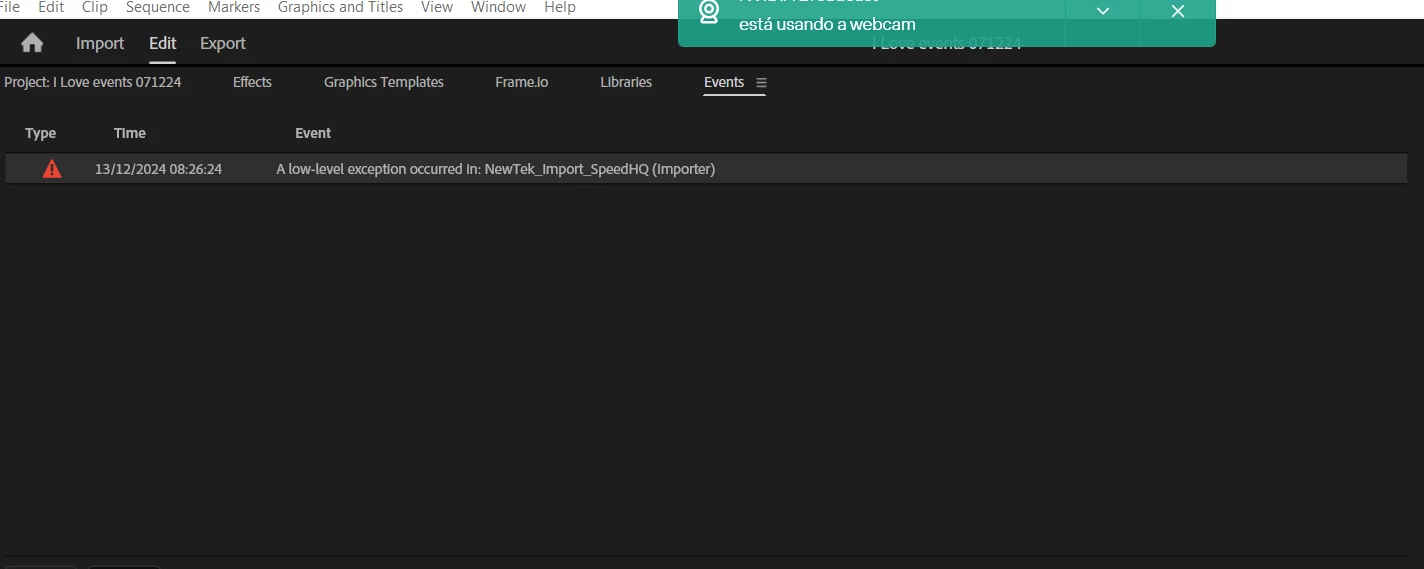
a low level exception occurred in newtek_import_SpeedHQ (importer)

  • December 13, 2024
  • 1 reply
  • 1005 views

There is a problem that started to occurs today, when we oppened Adobe Premiere 2025 new project or an old one, this error appears and no video is displayed, remmenbering that this error occurs on new projects withou any video imported just needed to create a new one and when the interface appears the error is therem how can I solve this? I only used th standard template that came with premiere.
 

Correct answer geekazine

Well, I know I tried all that, and it still didn't solve the problem. The issue is if you have NDI installed and the plugin for Adobe. Uninstalling NDI will resolve the exception. I am not sure if there is a way to rip the NewTek import speedhq anywhere - reinstalling NDI doesn't give you an option to not install specific programs. 

It might be a case where you have to take it out by hand, then reinstall Premiere. 

1 reply

Community Expert
December 14, 2024

Hello, 

Here’s a quick guide to help you fix it:

Change Render Settings:

  • Go to File > Project Settings > General.
  • In the Renderer section, select Mercury Playback Engine Software Only. This helps with overall performance and playback speed.

Clear Media Cache:

  • Navigate to Edit > Preferences > Media Cache.
  • Click on Delete to clear out any old cache files that could be causing issues.

Update Adobe Premiere Pro:

  • Open your Creative Cloud app.
  • Check for updates and install the latest version of Premiere Pro.

Disable Hardware Acceleration:

  • Go to Edit > Preferences > Media.
  • Uncheck Hardware Accelerated Decoding and click OK.
  • Restart Premiere Pro to apply the changes.
T-Sal
Participant
December 28, 2024

Señor, está insinuando que debo desactivar la aceleración por hardware y trabajar con el software lento de Adobe Premiere ?