

PosadaPhotography
Inspiring
April 24, 2025
Question

A Transition is driving me nuts

  • April 24, 2025
  • 1 reply
  • 143 views

OK...I'm using a Video Transition/Dissolve transition to fade a cut into the next. I'm using cross-dessolve and what I WANT to see is in graphic #1 below...I have several placed successfuly.

#1:
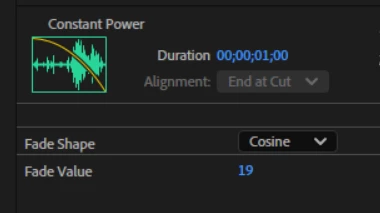
However, starting today, when I apply the same thing (I think), I'm getting:

#2
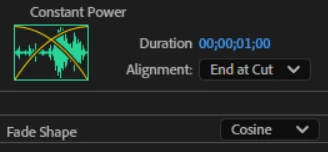
I want ONLY the down-slope. What am I doing wrong and how do I get it to what appears in Graphic #1. Ami I using the wrong effect?

Thanks

1 reply

Community Manager
April 24, 2025

Hi PosadaPhotography,

It seems to be happening because of the clip handles. While applying the transition, if you don't have clip handles (extra footage before the clip's in-point & after the clip's out-point), then you will get a transition where only the first clip fades out. This is what you are seeing in the first screenshot. 
On the other hand, if you have sufficient outgoing & incoming clip handles, you will get a better transition where the first clip fades out & the second clip fades in. This is what you have in the second screenshot. Please take a look at this link to learn more about clip handles & transitions.

If you only want a one-sided fade in or fade out, you can click the fade handles on the audio clip and then drag them left or right to apply an audio fade. You may refer to this link to learn more about working with audio transitions. Hope it helps.


Thanks,

Sumeet