
Abnormal Audio Export Issue
I edit multiple audio clips (from the same source) onto A2, which is panned to the middle. On the timeline, it plays back audibly. I export via Pr (H.264 as part of a video), the audio comes out inaudbile - the rest of the audio in the sequence exports fine. I go back to the timeline, that A2 audio is now inaudible on the timeline.
I've tried copy-pasting to a new, blank sequence; same problem. I dumped my media cache and peak files. Nothing. I closed Pr and rebooted my laptop repeatedly. Nothing. I just updated to 14.6.0. Nothing - although now I have the linear interpolation bug (yay!).
When I step all the way in to view the timeline up close, the waveforms disappear or appear altered.
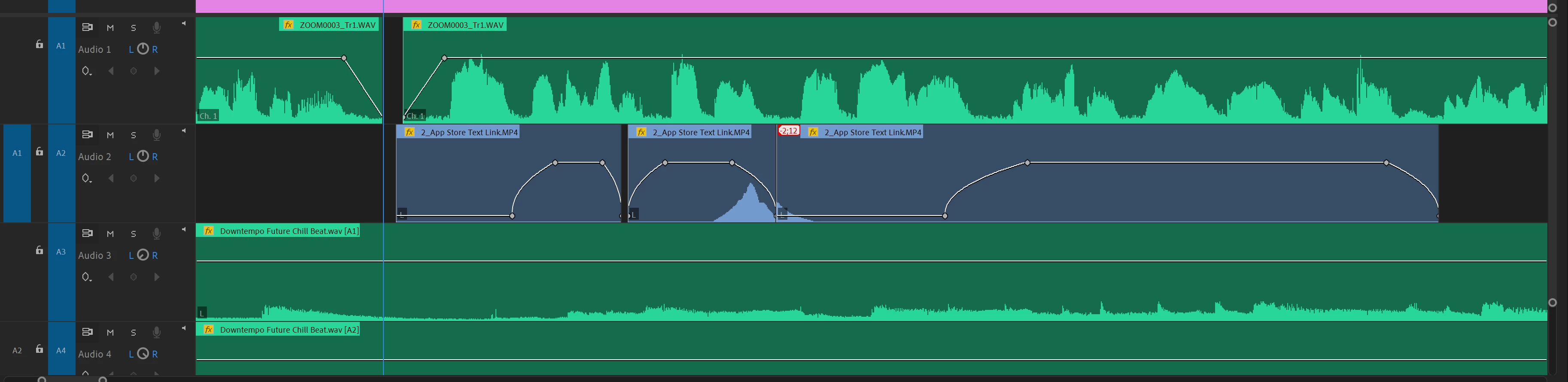
When I step out just once from the above view, this is what I get:
I've also tried just exporting as a .WAV and nothing is audible. I have tried importing another version of the original file, which doesn't change anything. FWIW, I will also add that this is a screen recording from an iPhone - as I know these files can sometimes be difficult to work with, but this has not been the case up until now. NOTE: I just discovered that the sequence exports just fine via Media Encoder, but the problem persists in Premiere.
I am working on an HP ZBook 15 G5:
Win10
i7-8750H w/ CPU @ 2.20 GHz
64-bit OS
32GB RAM
Thanks in advance!
 AdChoices