
March 31, 2017
Question

Accelerated render error when rendering transform effect

  • March 31, 2017
  • 4 replies
  • 4727 views

Hi,

I get this error when trying to render a 20 frame transition containing a Transform effect in my timeline (Premiere)
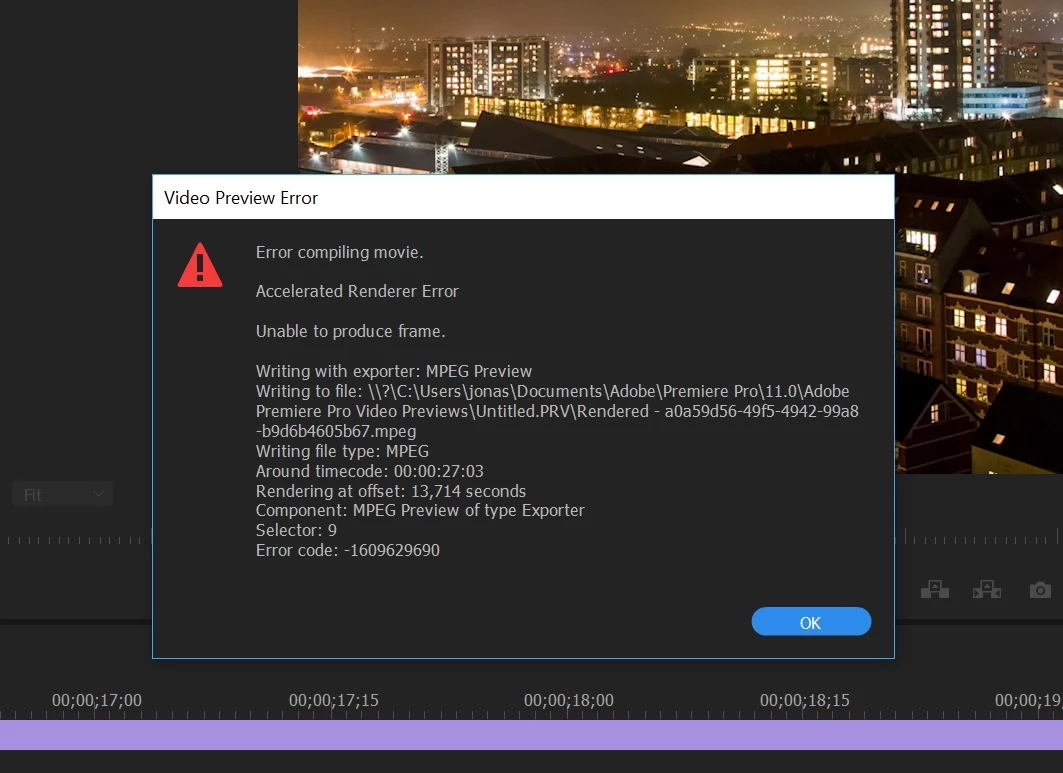
The 13,714 second mark is right at the transition.

Graphics driver are up to date.

Im running a 1080x1080 timeline for Instagram and regular Cineform files 10-bit around 5K resolution.

Restart of Premiere does not work. However a shift from Mercury Playback (CUDA) to Mercury Playback only does solve the problem, bit it's painfully slow to render my timeline.

Any ideas of what I can do?

[Moved from non-technical Lounge to Premiere Pro forum by moderator]

This topic has been closed for replies.

4 replies

Participant
August 23, 2024

Adobe rep giving a fix for this in 2019 below. IT'S 2024 AND THIS IS STILL HAPPENING.

JFC. Adobe is pathetic.

jmvdigital
Known Participant
March 29, 2023

This error still pops up under certain circumstances... in 2023. Awesome job Adobe!

jmvdigital
Known Participant
March 29, 2023

AND you can no longer workaround this to do just a software render in Premiere 2023 on an M1 Mac. It's locked in Metal GPU. 

davids17320844
Participant
May 8, 2019

I've been getting this exact error when exporting a video with several clips using the transform effect. Then when I switched to software only rendering (taking forever like you said) it CHANGED THE POSITIONING OF THE GRAPHICS, so the export was totally unusable. Unbelievable, and now I'll probably have to start completely over with these graphic animations, and do it in AE instead.

Ann Bens
Community Expert
Community Expert
May 8, 2019

Export the problem area with Software only to an intermediate file.

Put that on the timeline instead.

davids17320844
Participant
May 8, 2019

Thank you, Ann. I'll give this a shot! I had thought about that, but thought there would be no way it would work since I imagined it would "bake in" the incorrect positioning. What do you suggest as the intermediate file type?

Legend
April 1, 2017

Any ideas of what I can do?

Software rendering is the only fix I've found.