
davidh54327476
Participant
February 18, 2018
Answered

Accessing "Keying/Ultra Key" on Free Trial

  • February 18, 2018
  • 3 replies
  • 4908 views

I have just downloaded the free 7 day trial of Premier Pro CC, and cannot find the "Keying" option under "Effects". There are only 3 options under Video Effects - Motion, Opacity and Time Mapping .... but no Keying.  I am trialling Premier Pro specifically for the chroma key function ....

Can anyone help??

Dave
    This topic has been closed for replies.
    Correct answer Ann Bens

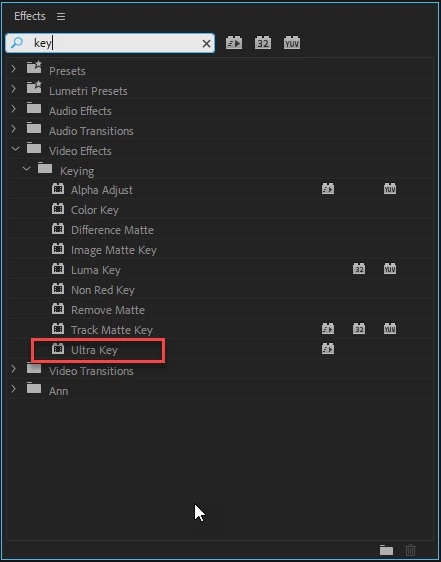
    Effect are found in the Effects Panel which is not the same as the Effect Controls panel which contains the Motion etc.

    Adobe Premiere Pro Learn & Support

    3 replies

    February 10, 2020

    I updated the program to the latest version but I still don't see the "keying" option

    Legend
    February 18, 2018
    Ann Bens
    Community Expert
    Ann BensCommunity ExpertCorrect answer
    Community Expert
    February 18, 2018

    Effect are found in the Effects Panel which is not the same as the Effect Controls panel which contains the Motion etc.

    Adobe Premiere Pro Learn & Support

    davidh54327476
    Participant
    February 18, 2018

    Hmm.  How do I access the Effects panel?

    davidh54327476
    Participant
    February 18, 2018

    All sorted - got it - many thanks!

    Dave