
Add a new caption to timeline between two other captions: it grabs the next caption instead
I have the playpoint of the video in the timeline between two subtitles. There's about 2.5 seconds between them. When I go to the Edit > Text > Captions pane and press the + button to add a new caption, instead of inserting a subtitle at the marker with a duration up to the next subtitle, it just grabs the next subtitle, pulls back the start of it to the marker and then deletes the text in it and replaces it with "New Caption"
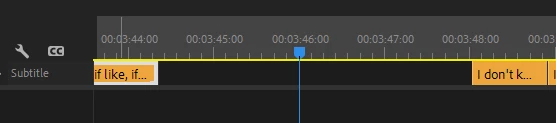

I've had to learn that new captions have to take up a set amount of space before they can be created, but I don't know why this is the case when we're working with a one dimentional timeline with clear empty and full spaces. This really just needs to dynamically insert an empty caption that is up to the default duration OR the next caption, whichever comes first. Then I can pull the ends to whereever I need it to start and stop.
 AdChoices