Participant
January 26, 2018
Answered

Adding black bars on top and bottom - no cropping

  • January 26, 2018
  • 3 replies
  • 10778 views

I'm making videos for web content - facebook, Instagram, etc.

My videos are 16:9 which is fine, but I want to get that video in a 1:1 box so that I have room on top for a header and subtitles on the bottom. I've searched around but it's hard to find what I'm looking for when I don't know what the techniques are called.


Any help would be appreciated. Thanks!
    This topic has been closed for replies.
    Correct answer Meg The Dog

    Drag one of your source clips to the New Item icon at the bottom right of the Project Panel. When you see the + sign, release the mouse.

    This will create a new sequence with your source clip in it.

    Click anywhere in the timeline.

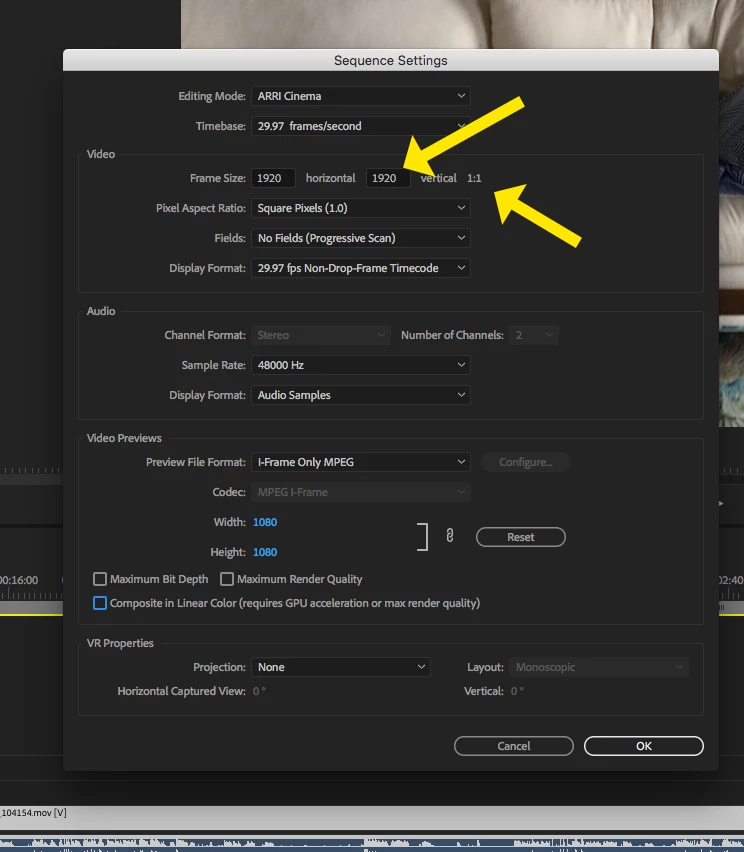
    Go to the menu Sequence > Sequence Settings.

    When the Sequence Settings Pane opens, set the Vertical pixel dimension to the same number as the Horizontal pixel dimension, This will create a 1:1 aspect ratio:

    Click OK. You will get a warning about any previous previews not matching your new setting, you can dismiss that.

    You'll now have a 1:1 aspect timeline.

    Depending on the horsepower of your computer, since you are working in a non-standard size, you may have to render in order to see playback.

    MtD

    3 replies

    pxchoiAuthor
    Participant
    January 26, 2018

    I don't think it was shot 4:3. There's a "full version" of the video on his website and its in normal 16:9 without the top and bottom stuff. It doesn't need to look professional, I just need my audience to watch it when their on the go and on their phones.

    Legend
    January 26, 2018

    Well, add your graphics over the clips and scale down the clips until they're no longer covered.

    pxchoiAuthor
    Participant
    January 26, 2018

    This is basically the type of video that I want to create. That way people that are viewing on social media can easily see what the video is about and read along if they can't listen.

    Tom Ferry - Do you have a morning routine? The key to a...

    Legend
    January 26, 2018

    That's a 4:3 video in a 16:9 frame.  It comes across as very...amateur.

    Fill the frame.  If you intend to have graphics in the frame, take that into account when you shoot the subject.

    Legend
    January 26, 2018

    My preferred method would be to change the size of the sequence to match what I was delivering.

    The problem here is that your desired aspect ratio just isn't standard any more, and since most online players are 16:9, you'll end up with the bars on top and bottom that you add, plus bars on the sides added by the player.

    Put another way, what you want just isn't a good idea.  You should have shot the material with a 2.39:1 framing, which will provide the desired top and bottom bars in the standard 16:9 frame size.